# Service Scheduler - Administration

# Updating registration details

Login as an administrator user

Select the system menu (or padlock)

[![image.png](https://wiki.abitsystems.com.au/uploads/images/gallery/2024-06/scaled-1680-/F9GprX8zCIN61koz-image.png)](https://wiki.abitsystems.com.au/uploads/images/gallery/2024-06/F9GprX8zCIN61koz-image.png)

Navigation to System and search settings for "registration\_", edit the entry

[![image.png](https://wiki.abitsystems.com.au/uploads/images/gallery/2024-06/scaled-1680-/4xOZTHltX66IJFxp-image.png)](https://wiki.abitsystems.com.au/uploads/images/gallery/2024-06/4xOZTHltX66IJFxp-image.png)

Enter the new key and press save

[![image.png](https://wiki.abitsystems.com.au/uploads/images/gallery/2024-06/scaled-1680-/jNnbLZNLAdmGEkUn-image.png)](https://wiki.abitsystems.com.au/uploads/images/gallery/2024-06/jNnbLZNLAdmGEkUn-image.png)

# Service Scheduler - server installation guide

MySQL

See [MySQL installation guide](https://help.abitsystems.com.au/books/mysql-installation-guide "MySQL installation guide")

# Zero config / Auto Discover

See this guide for detailed setup of [Zero config](https://help.abitsystems.com.au/books/zero-config "Zero config")

# System settings

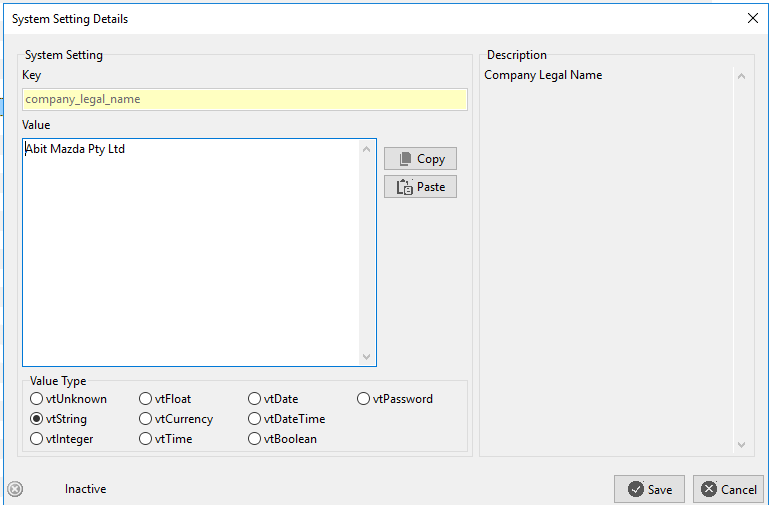
System settings contain many default and system options for Service Scheduler. Care should be taken before adjusting these settings.

<p class="callout info">NOTE: For changes to apply it is recommended that users restart the application</p>

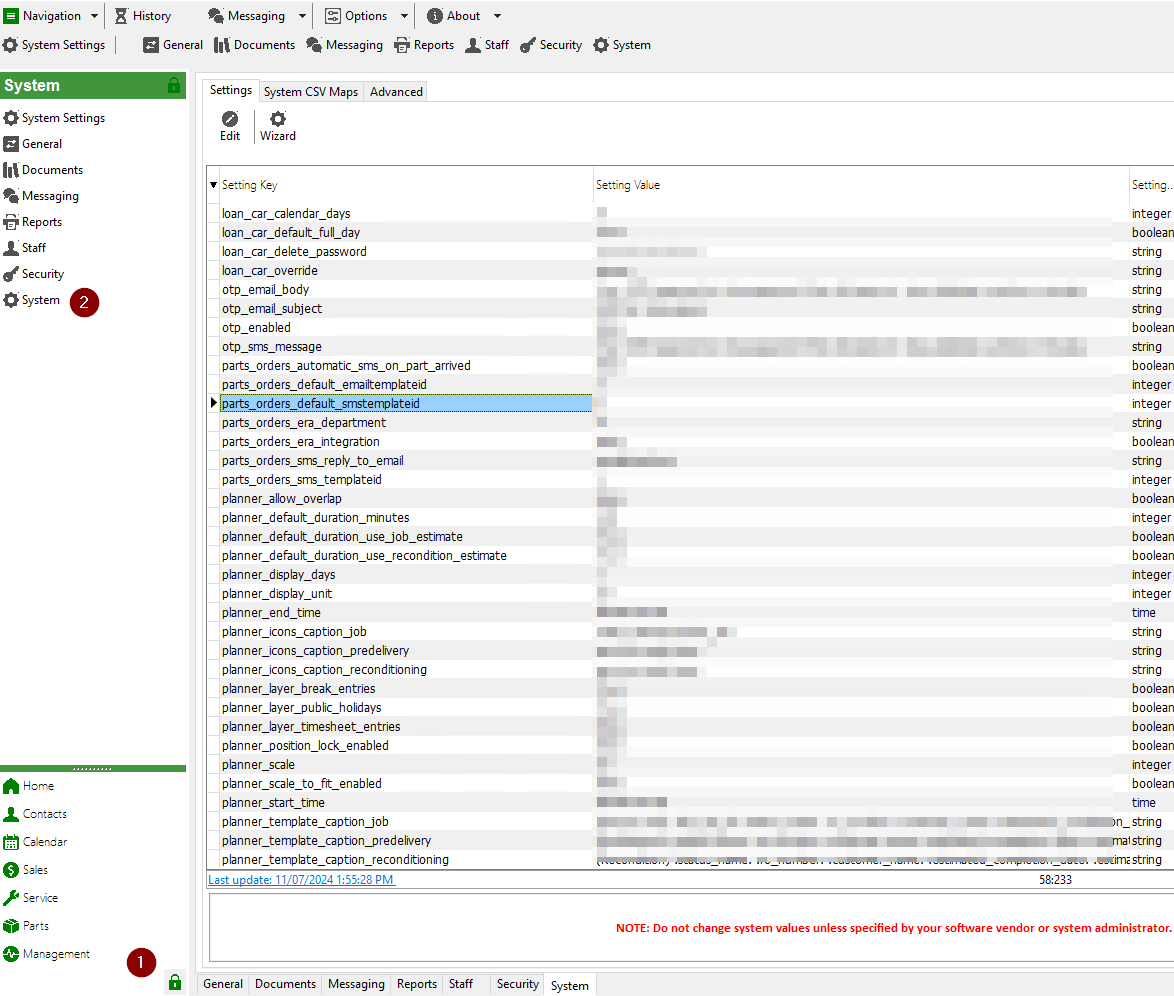
To access system settings

[![image.png](https://help.abitsystems.com.au/uploads/images/gallery/2024-07/scaled-1680-/PIoimage.png)](https://help.abitsystems.com.au/uploads/images/gallery/2024-07/PIoimage.png)

Edit a setting to make changes

[![image.png](https://help.abitsystems.com.au/uploads/images/gallery/2024-07/scaled-1680-/YYaimage.png)](https://help.abitsystems.com.au/uploads/images/gallery/2024-07/YYaimage.png)
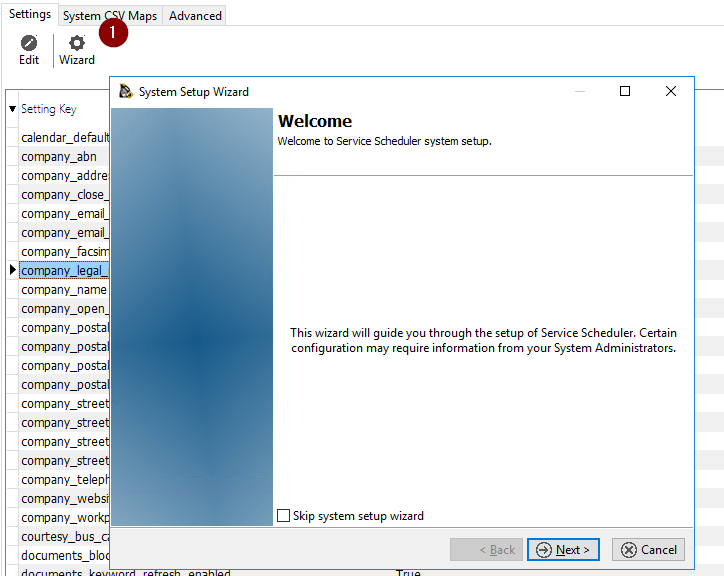
### System setup wizard

A wizard is available to prompt an administrator through common system settings

[![image.png](https://help.abitsystems.com.au/uploads/images/gallery/2024-07/scaled-1680-/dHTimage.png)](https://help.abitsystems.com.au/uploads/images/gallery/2024-07/dHTimage.png)
# User administation

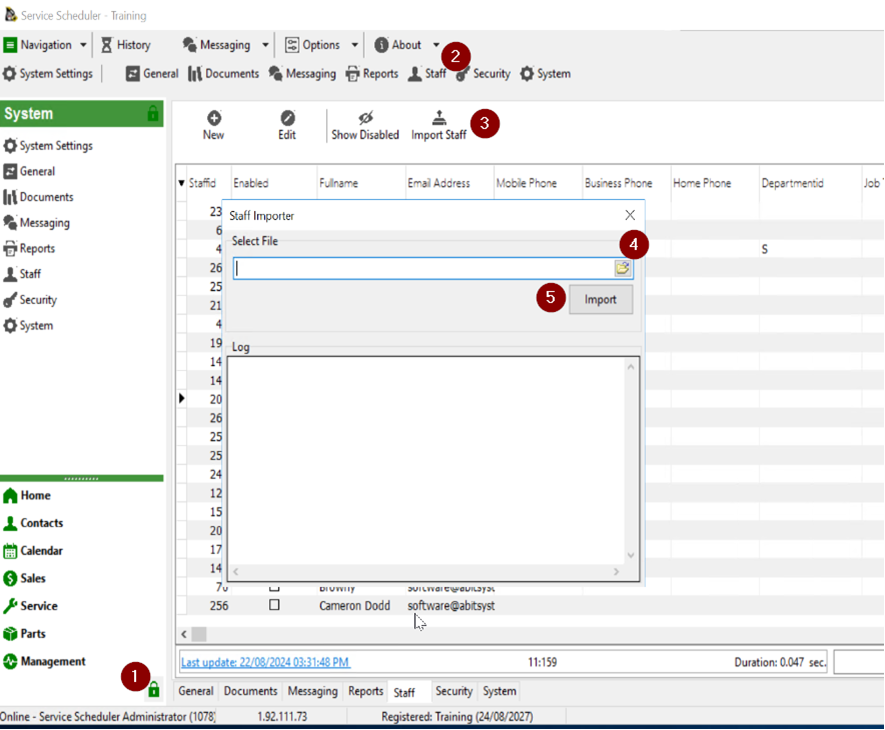
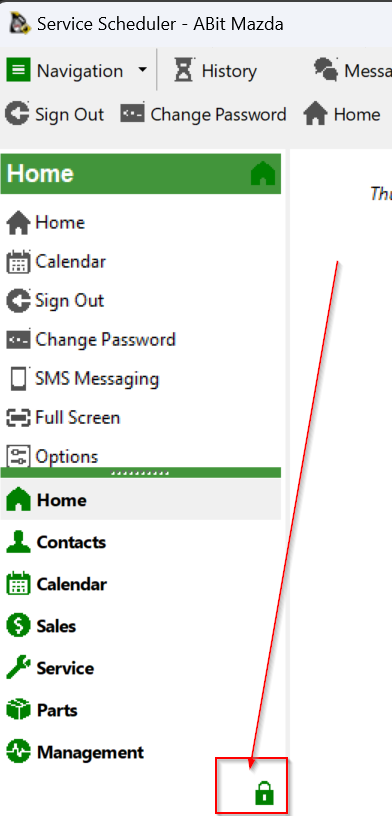
Select administration area

[![image.png](https://help.abitsystems.com.au/uploads/images/gallery/2024-08/scaled-1680-/image.png)](https://help.abitsystems.com.au/uploads/images/gallery/2024-08/image.png)
### Local user accounts

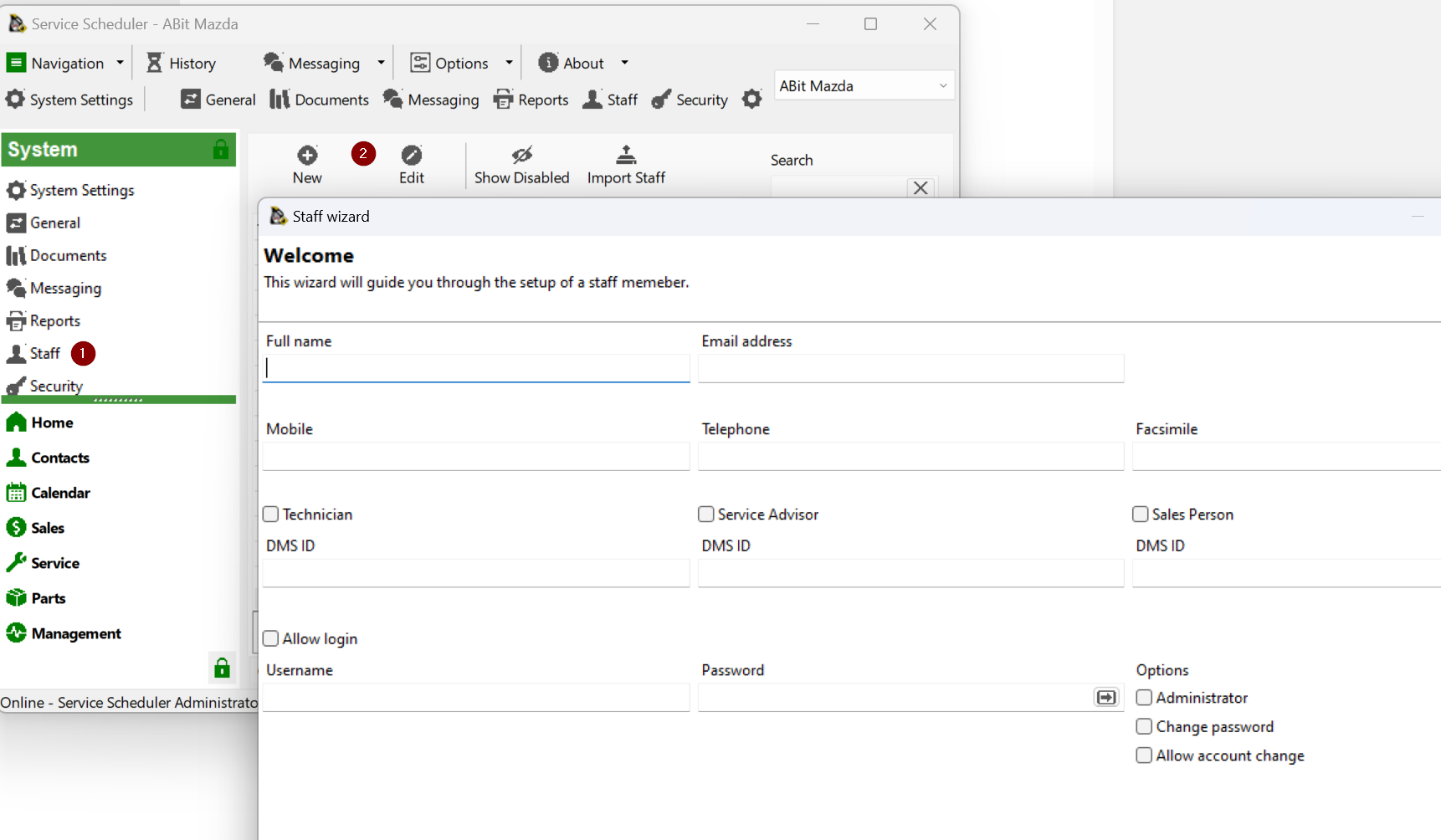
#### Creating a new staff member

Start the new staff wizard, enter required information if the user is required to login check the "Allow login" box

[![image.png](https://help.abitsystems.com.au/uploads/images/gallery/2024-08/scaled-1680-/nzZimage.png)](https://help.abitsystems.com.au/uploads/images/gallery/2024-08/nzZimage.png)
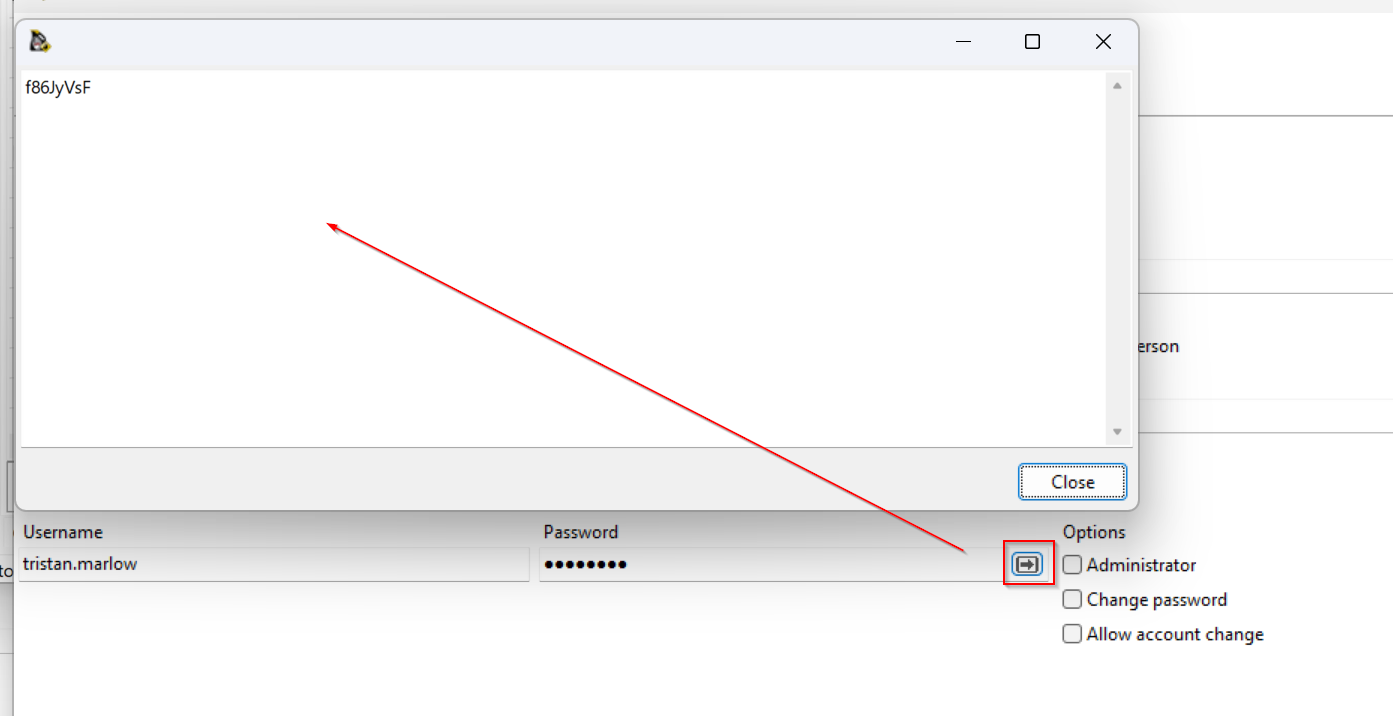
You can use the generate password button to create a password

[![image.png](https://help.abitsystems.com.au/uploads/images/gallery/2024-08/scaled-1680-/6pHimage.png)](https://help.abitsystems.com.au/uploads/images/gallery/2024-08/6pHimage.png)
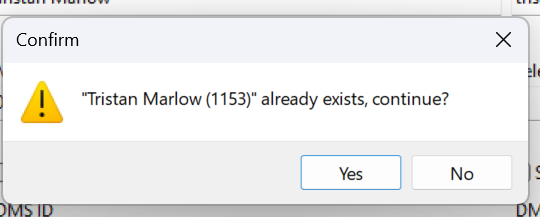
Service scheduler will check for a similar name to ensure that the user

[![image.png](https://help.abitsystems.com.au/uploads/images/gallery/2024-08/scaled-1680-/EYzimage.png)](https://help.abitsystems.com.au/uploads/images/gallery/2024-08/EYzimage.png)
#### Edit existing staff member

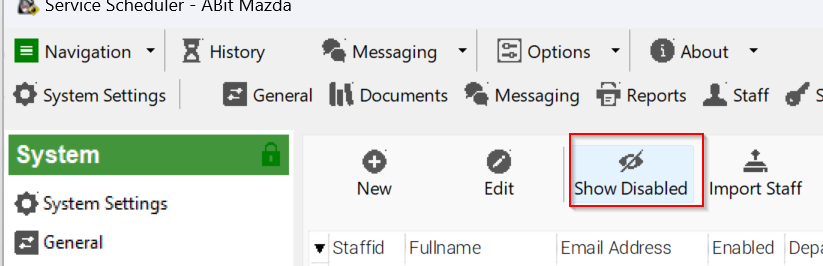
To find a staff member that has had their account disabled. Select the following button

[![image.png](https://help.abitsystems.com.au/uploads/images/gallery/2024-08/scaled-1680-/8KMimage.png)](https://help.abitsystems.com.au/uploads/images/gallery/2024-08/8KMimage.png)
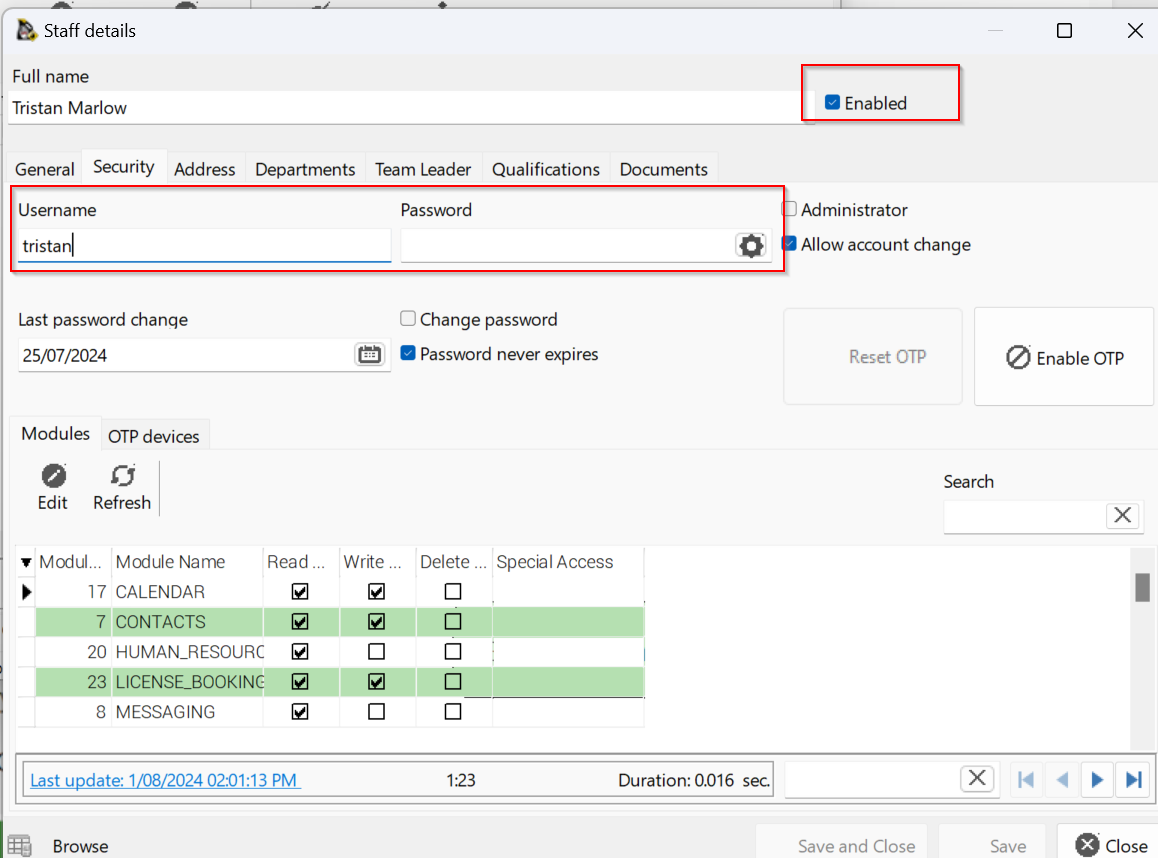
Adjust user details as required

[![image.png](https://help.abitsystems.com.au/uploads/images/gallery/2024-08/scaled-1680-/CEJimage.png)](https://help.abitsystems.com.au/uploads/images/gallery/2024-08/CEJimage.png)
### LDAP Integration (Active Directory)

To enable LDAP integration, navigate to system settings and search for "ldap"

[![image.png](https://help.abitsystems.com.au/uploads/images/gallery/2024-08/scaled-1680-/FkYimage.png)](https://help.abitsystems.com.au/uploads/images/gallery/2024-08/FkYimage.png)
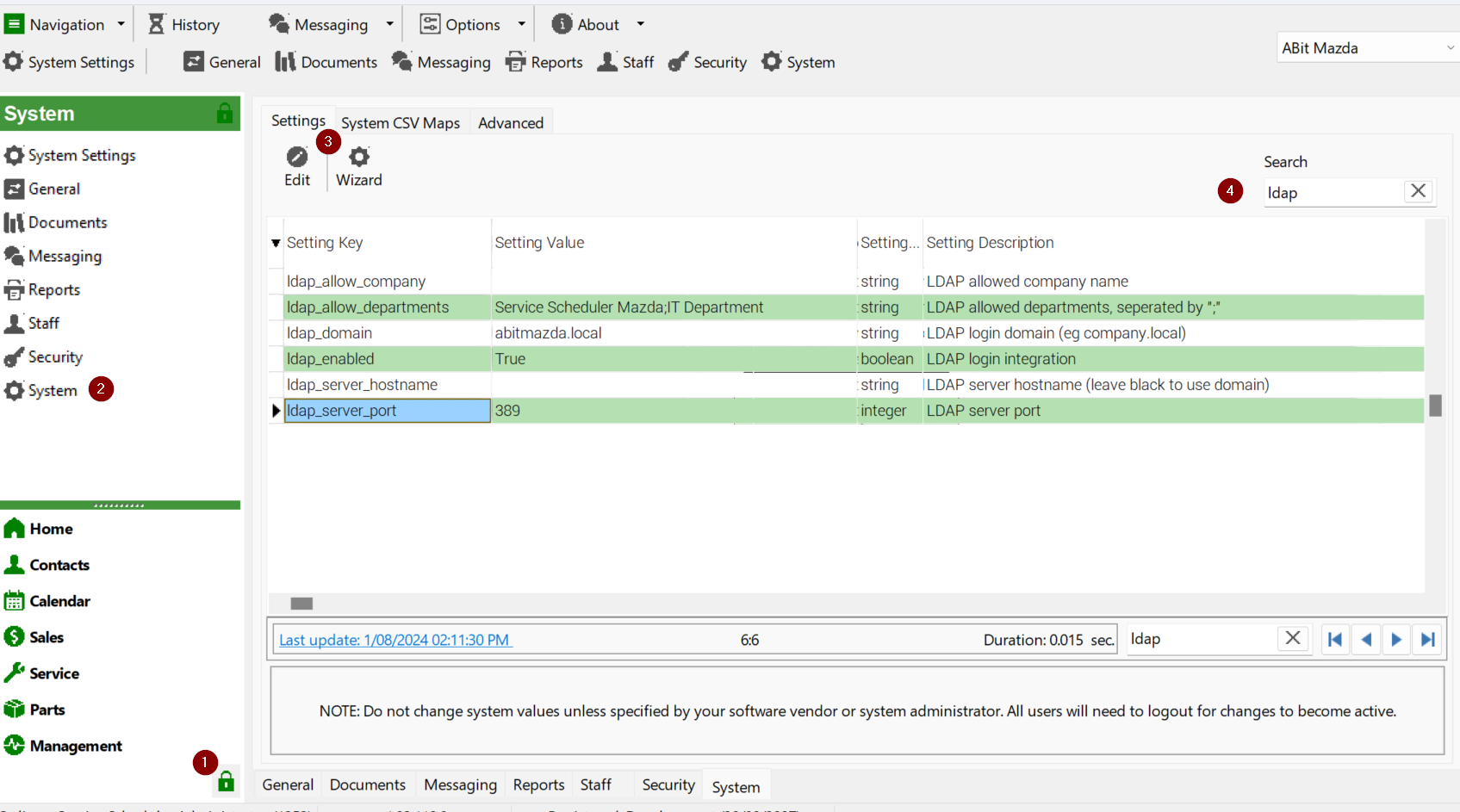
<table border="1" id="bkmrk-ldap_allow_company-t" style="border-collapse: collapse; width: 100%;"><colgroup><col style="width: 50%;"></col><col style="width: 50%;"></col></colgroup><tbody><tr><td>ldap\_allow\_company</td><td>This will look at the users "company" and if matches will allow login/ Blank will allow any company value.</td></tr><tr><td>ldap\_allow\_departments</td><td>This will look at group the user is a member of and if they match a group name </td></tr><tr><td>ldap\_domain</td><td>Your LDAP / Active Directory domain name</td></tr><tr><td>ldap\_server\_hostname</td><td>The domain will be used to find a server via DNS but a specific server can be specified.</td></tr><tr><td>ldap\_server\_port</td><td>Port to communicate for LDAP requests</td></tr></tbody></table>

Departments / Active Directory groups are the recommended method of controller

[![image.png](https://help.abitsystems.com.au/uploads/images/gallery/2024-08/scaled-1680-/Mzhimage.png)](https://help.abitsystems.com.au/uploads/images/gallery/2024-08/Mzhimage.png)
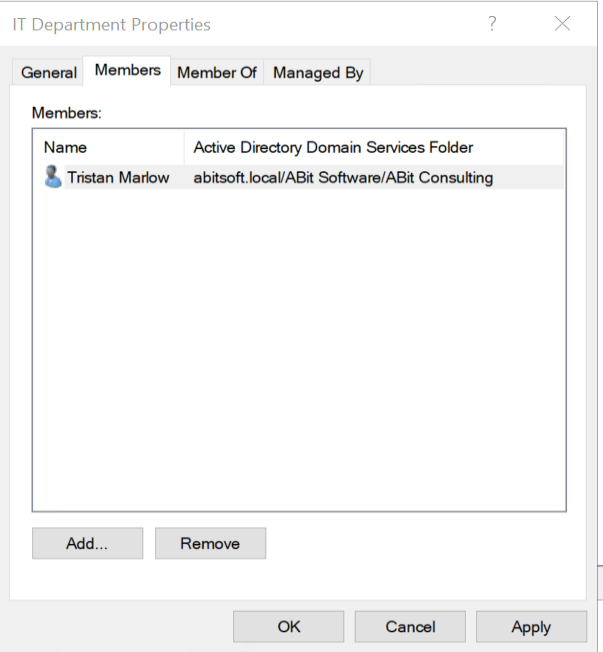
As the password is controlled by LDAP, attempting to change the password will result in "User passwords are managed by LDAP integration"

[![image.png](https://wiki.abitsystems.com.au/uploads/images/gallery/2024-07/scaled-1680-/Blt3uX71JGk4xrDd-image.png)](https://wiki.abitsystems.com.au/uploads/images/gallery/2024-07/Blt3uX71JGk4xrDd-image.png)

### Bulk Import

Create a CSV file with the following format.

<table border="0" cellpadding="0" cellspacing="0" id="bkmrk-dmsid-fullname-email" style="border-collapse: collapse; width: 915px; height: 205.917px;" width="640"><colgroup><col span="8" style="width: 105.625px;" width="64"></col></colgroup><tbody><tr style="height: 46.25px;"><td height="17" style="height: 46.25px; width: 48pt;" width="64">dmsid</td><td style="width: 48pt; height: 46.25px;" width="64">fullname</td><td style="width: 48pt; height: 46.25px;" width="64">email\_address</td><td style="width: 48pt; height: 46.25px;" width="64">username</td><td style="width: 48pt; height: 46.25px;" width="64">password</td><td style="width: 48pt; height: 46.25px;" width="64">administrator</td><td style="width: 48pt; height: 46.25px;" width="64">advisor</td><td style="width: 48pt; height: 46.25px;" width="64">technician</td></tr><tr style="height: 79.8333px;"><td height="17" style="height: 79.8333px;"> </td><td style="height: 79.8333px;">Joe Boss</td><td style="height: 79.8333px;">joe.boss@company.com</td><td style="height: 79.8333px;">joe.boss</td><td style="height: 79.8333px;">\#password2024!</td><td align="right" style="height: 79.8333px;">1</td><td align="right" style="height: 79.8333px;">0</td><td align="right" style="height: 79.8333px;">0</td></tr><tr style="height: 79.8333px;"><td height="17" style="height: 79.8333px;"> </td><td style="height: 79.8333px;">Joe Advisor</td><td style="height: 79.8333px;">joe.advisor@company.com</td><td style="height: 79.8333px;">joe.advisor</td><td style="height: 79.8333px;">\#password2024!</td><td align="right" style="height: 79.8333px;">0</td><td align="right" style="height: 79.8333px;">1</td><td align="right" style="height: 79.8333px;">0</td></tr></tbody></table>

[![image.png](https://help.abitsystems.com.au/uploads/images/gallery/2024-08/scaled-1680-/SFXimage.png)](https://help.abitsystems.com.au/uploads/images/gallery/2024-08/SFXimage.png)

# User administation - account switching

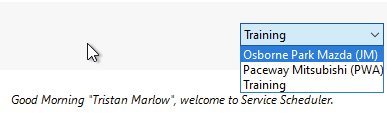
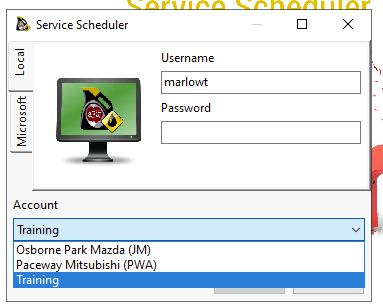
When multiple dealerships are setup in Service Scheduler, users may be granted access to swap between sites without logging out and logging back in.

<table border="1" id="bkmrk-" style="border-collapse: collapse; width: 100%;"><colgroup><col style="width: 50%;"></col><col style="width: 50%;"></col></colgroup><tbody><tr><td>[![image.png](https://help.abitsystems.com.au/uploads/images/gallery/2025-01/scaled-1680-/image.png)](https://help.abitsystems.com.au/uploads/images/gallery/2025-01/image.png)  
</td><td>[![image.png](https://help.abitsystems.com.au/uploads/images/gallery/2025-01/scaled-1680-/QXrimage.png)](https://help.abitsystems.com.au/uploads/images/gallery/2025-01/QXrimage.png)

</td></tr></tbody></table>

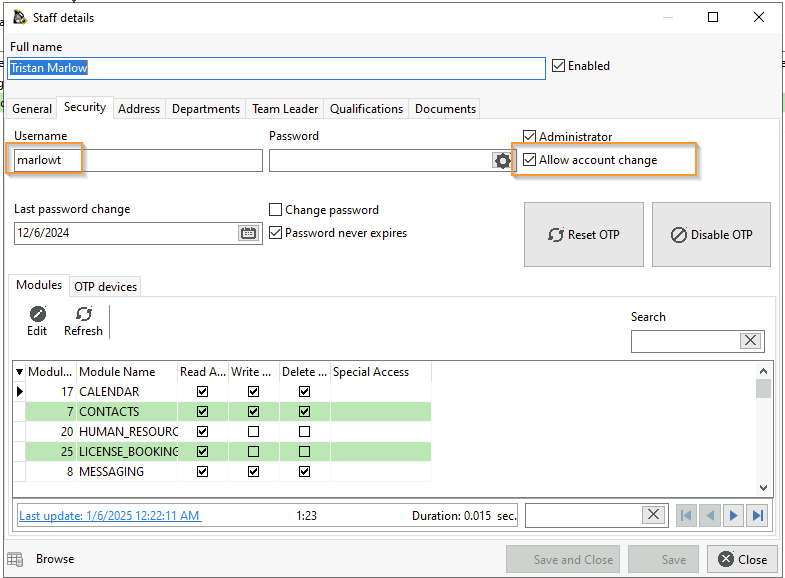
To enable, "Allow account change" must be checked in each account they are allowed to swap from. And the user must exist in all accounts with the same "username"

<p class="callout info">The passwords do not need to match, however in a local account setup it is recommended to avoid confusion if the user attempts to login to an account from the login dialog.</p>

[![image.png](https://help.abitsystems.com.au/uploads/images/gallery/2025-01/scaled-1680-/Owvimage.png)](https://help.abitsystems.com.au/uploads/images/gallery/2025-01/Owvimage.png)

# User administation - global user

Open HeidiSQL

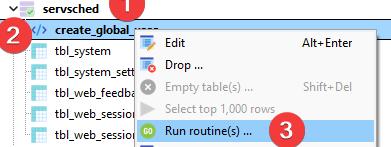
Navigate to root catalog eg servsched. Find create\_global\_user

[![image.png](https://help.abitsystems.com.au/uploads/images/gallery/2026-01/scaled-1680-/4Zfimage.png)](https://help.abitsystems.com.au/uploads/images/gallery/2026-01/4Zfimage.png)
[![image.png](https://help.abitsystems.com.au/uploads/images/gallery/2026-01/scaled-1680-/IKuimage.png)](https://help.abitsystems.com.au/uploads/images/gallery/2026-01/IKuimage.png)

[![image.png](https://help.abitsystems.com.au/uploads/images/gallery/2026-01/scaled-1680-/qY0image.png)](https://help.abitsystems.com.au/uploads/images/gallery/2026-01/qY0image.png)

[![image.png](https://help.abitsystems.com.au/uploads/images/gallery/2026-01/scaled-1680-/C7Jimage.png)](https://help.abitsystems.com.au/uploads/images/gallery/2026-01/C7Jimage.png)

[![image.png](https://help.abitsystems.com.au/uploads/images/gallery/2026-01/scaled-1680-/N24image.png)](https://help.abitsystems.com.au/uploads/images/gallery/2026-01/N24image.png)

1 = administrator, 0 = standard user

[![image.png](https://help.abitsystems.com.au/uploads/images/gallery/2026-01/scaled-1680-/0pLimage.png)](https://help.abitsystems.com.au/uploads/images/gallery/2026-01/0pLimage.png)
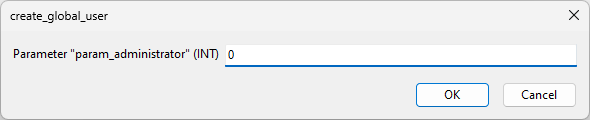
Right click and press Run (or F9)

if you had more than one user you can add multiple lines, just ensure each line ends with ';'

```sql
CALL `create_global_user`('Bob Johnson', 'bob.johnson@company.com', 'bob.johnson', 'unhackable', '0');
CALL `create_global_user`('Jane Johnson', 'jane.johnson@company.com', 'jane.johnson', 'unhackable', '0');
```

[![image.png](https://help.abitsystems.com.au/uploads/images/gallery/2026-01/scaled-1680-/hiDimage.png)](https://help.abitsystems.com.au/uploads/images/gallery/2026-01/hiDimage.png)

# SMS Integration

SMS messaging is an optional component. Messaging is provided by irwinSolutions Pty Ltd ([http://www.irwinsolutions.com/)](http://www.irwinsolutions.com/)) where credit can be prepaid.

### Enable integration

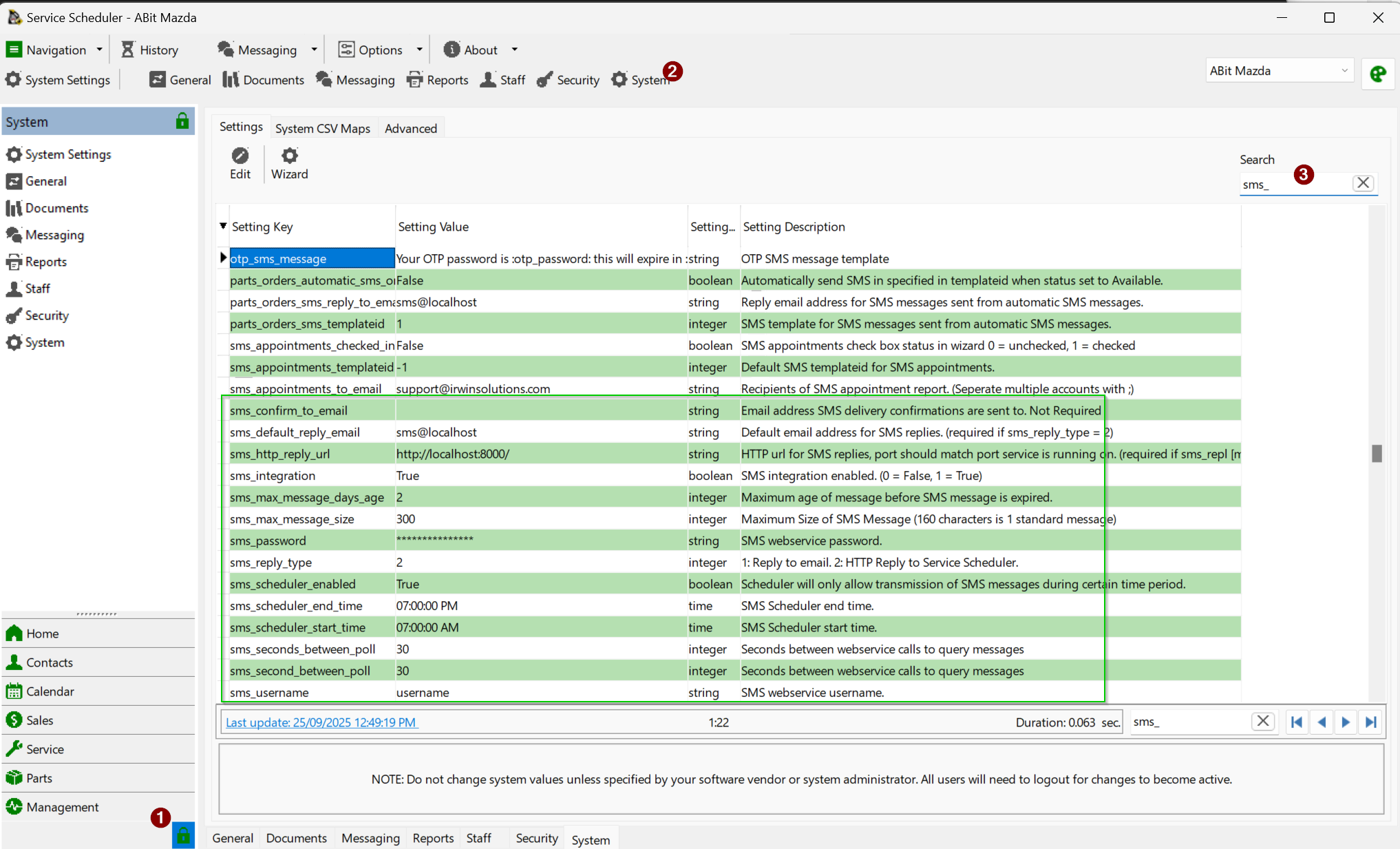
SMS settings are located in System -&gt; System -&gt; Setting

[![image.png](https://help.abitsystems.com.au/uploads/images/gallery/2025-09/scaled-1680-/LcTimage.png)](https://help.abitsystems.com.au/uploads/images/gallery/2025-09/LcTimage.png)

Once and account has been provided set **sms\_integration** to 1 and update **sms\_username** and **sms\_password** with credentials.

If you would like customer SMS replies to go to an email address set **sms\_default\_reply\_email**

SMS replies are possible back to Service Scheduler, this requires port forwards to the Service Scheduler server port (default 8090) and then a public URL back to this instance set into **sms\_http\_reply\_url**. (eg [http://mycompany.com:8090](http://mycompany.com:8090))

<p class="callout info">Check with your IT or network administrator that the Service Scheduler server can access [primary.smartmessagingservices.net/gateway/services/SMSService?wsdl](https://primary.smartmessagingservices.net/gateway/services/SMSService?wsdl)</p>

<table border="1" cellpadding="0" cellspacing="0" class="MsoNormalTable" id="bkmrk-sms_confirm_to_email" style="border-collapse: collapse; border: none; width: 100%; height: 352.812px;"><tbody><tr style="height: 24.125px;"><td style="border: 1pt solid silver; padding: 2.25pt; width: 20.9363%; height: 24.125px;" valign="top">sms\_confirm\_to\_email

</td><td style="border-top: 1pt solid silver; border-right: 1pt solid silver; border-bottom: 1pt solid silver; border-image: initial; border-left: none; padding: 2.25pt; width: 78.905%; height: 24.125px;" valign="top">Email address SMS delivery confirmations are sent to. Not Required

</td></tr><tr style="height: 24.125px;"><td style="border-right: 1pt solid silver; border-bottom: 1pt solid silver; border-left: 1pt solid silver; border-image: initial; border-top: none; padding: 2.25pt; width: 20.9363%; height: 24.125px;" valign="top">sms\_default\_reply\_email

</td><td style="border-top: none; border-left: none; border-bottom: 1pt solid silver; border-right: 1pt solid silver; padding: 2.25pt; width: 78.905%; height: 24.125px;" valign="top">Default email address for SMS replies. (required if sms\_reply\_type = 1)

</td></tr><tr style="height: 24.125px;"><td style="border-right: 1pt solid silver; border-bottom: 1pt solid silver; border-left: 1pt solid silver; border-image: initial; border-top: none; padding: 2.25pt; width: 20.9363%; height: 24.125px;" valign="top">sms\_http\_reply\_url

</td><td style="border-top: none; border-left: none; border-bottom: 1pt solid silver; border-right: 1pt solid silver; padding: 2.25pt; width: 78.905%; height: 24.125px;" valign="top">HTTP url for SMS replies, port should match port service is running on. (required if sms\_reply\_type = 1)

</td></tr><tr style="height: 24.125px;"><td style="border-right: 1pt solid silver; border-bottom: 1pt solid silver; border-left: 1pt solid silver; border-image: initial; border-top: none; padding: 2.25pt; width: 20.9363%; height: 24.125px;" valign="top">sms\_integration

</td><td style="border-top: none; border-left: none; border-bottom: 1pt solid silver; border-right: 1pt solid silver; padding: 2.25pt; width: 78.905%; height: 24.125px;" valign="top">SMS integration enabled. (0 = False, 1 = True)

</td></tr><tr style="height: 40.9167px;"><td style="border-right: 1pt solid silver; border-bottom: 1pt solid silver; border-left: 1pt solid silver; border-image: initial; border-top: none; padding: 2.25pt; width: 20.9363%; height: 40.9167px;" valign="top">sms\_max\_message\_days\_age

</td><td style="border-top: none; border-left: none; border-bottom: 1pt solid silver; border-right: 1pt solid silver; padding: 2.25pt; width: 78.905%; height: 40.9167px;" valign="top">Maximum age of message before SMS message is expired.

</td></tr><tr style="height: 24.125px;"><td style="border-right: 1pt solid silver; border-bottom: 1pt solid silver; border-left: 1pt solid silver; border-image: initial; border-top: none; padding: 2.25pt; width: 20.9363%; height: 24.125px;" valign="top">sms\_max\_message\_size

</td><td style="border-top: none; border-left: none; border-bottom: 1pt solid silver; border-right: 1pt solid silver; padding: 2.25pt; width: 78.905%; height: 24.125px;" valign="top">Maximum Size of SMS Message (160 characters is 1 standard message)

</td></tr><tr style="height: 24.125px;"><td style="border-right: 1pt solid silver; border-bottom: 1pt solid silver; border-left: 1pt solid silver; border-image: initial; border-top: none; padding: 2.25pt; width: 20.9363%; height: 24.125px;" valign="top">sms\_password

</td><td style="border-top: none; border-left: none; border-bottom: 1pt solid silver; border-right: 1pt solid silver; padding: 2.25pt; width: 78.905%; height: 24.125px;" valign="top">SMS webservice password.

</td></tr><tr style="height: 24.125px;"><td style="border-right: 1pt solid silver; border-bottom: 1pt solid silver; border-left: 1pt solid silver; border-image: initial; border-top: none; padding: 2.25pt; width: 20.9363%; height: 24.125px;" valign="top">sms\_reply\_type

</td><td style="border-top: none; border-left: none; border-bottom: 1pt solid silver; border-right: 1pt solid silver; padding: 2.25pt; width: 78.905%; height: 24.125px;" valign="top">1: Reply to email. 2: HTTP Reply to Service Scheduler.

</td></tr><tr style="height: 24.125px;"><td style="border-right: 1pt solid silver; border-bottom: 1pt solid silver; border-left: 1pt solid silver; border-image: initial; border-top: none; padding: 2.25pt; width: 20.9363%; height: 24.125px;" valign="top">sms\_scheduler\_enabled

</td><td style="border-top: none; border-left: none; border-bottom: 1pt solid silver; border-right: 1pt solid silver; padding: 2.25pt; width: 78.905%; height: 24.125px;" valign="top">Scheduler will only allow transmission of SMS messages during certain time period.

</td></tr><tr style="height: 24.125px;"><td style="border-right: 1pt solid silver; border-bottom: 1pt solid silver; border-left: 1pt solid silver; border-image: initial; border-top: none; padding: 2.25pt; width: 20.9363%; height: 24.125px;" valign="top">sms\_scheduler\_end\_time

</td><td style="border-top: none; border-left: none; border-bottom: 1pt solid silver; border-right: 1pt solid silver; padding: 2.25pt; width: 78.905%; height: 24.125px;" valign="top">SMS Scheduler end time.

</td></tr><tr style="height: 24.125px;"><td style="border-right: 1pt solid silver; border-bottom: 1pt solid silver; border-left: 1pt solid silver; border-image: initial; border-top: none; padding: 2.25pt; width: 20.9363%; height: 24.125px;" valign="top">sms\_scheduler\_start\_time

</td><td style="border-top: none; border-left: none; border-bottom: 1pt solid silver; border-right: 1pt solid silver; padding: 2.25pt; width: 78.905%; height: 24.125px;" valign="top">SMS Scheduler start time.

</td></tr><tr style="height: 24.125px;"><td style="border-right: 1pt solid silver; border-bottom: 1pt solid silver; border-left: 1pt solid silver; border-image: initial; border-top: none; padding: 2.25pt; width: 20.9363%; height: 24.125px;" valign="top">sms\_username

</td><td style="border-top: none; border-left: none; border-bottom: 1pt solid silver; border-right: 1pt solid silver; padding: 2.25pt; width: 78.905%; height: 24.125px;" valign="top">SMS webservice username.

</td></tr><tr style="height: 46.5208px;"><td style="border-right: 1pt solid silver; border-bottom: 1pt solid silver; border-left: 1pt solid silver; border-image: initial; border-top: none; padding: 2.25pt; width: 20.9363%; height: 46.5208px;" valign="top">sms\_wsdl

</td><td style="border-top: none; border-left: none; border-bottom: 1pt solid silver; border-right: 1pt solid silver; padding: 2.25pt; width: 78.905%; height: 46.5208px;" valign="top">SMS webservice WSDL. Leave as default [primary.smartmessagingservices.net/gateway/services/SMSService?wsdl](https://primary.smartmessagingservices.net/gateway/services/SMSService?wsdl)

</td></tr></tbody></table>

### SMS Templates

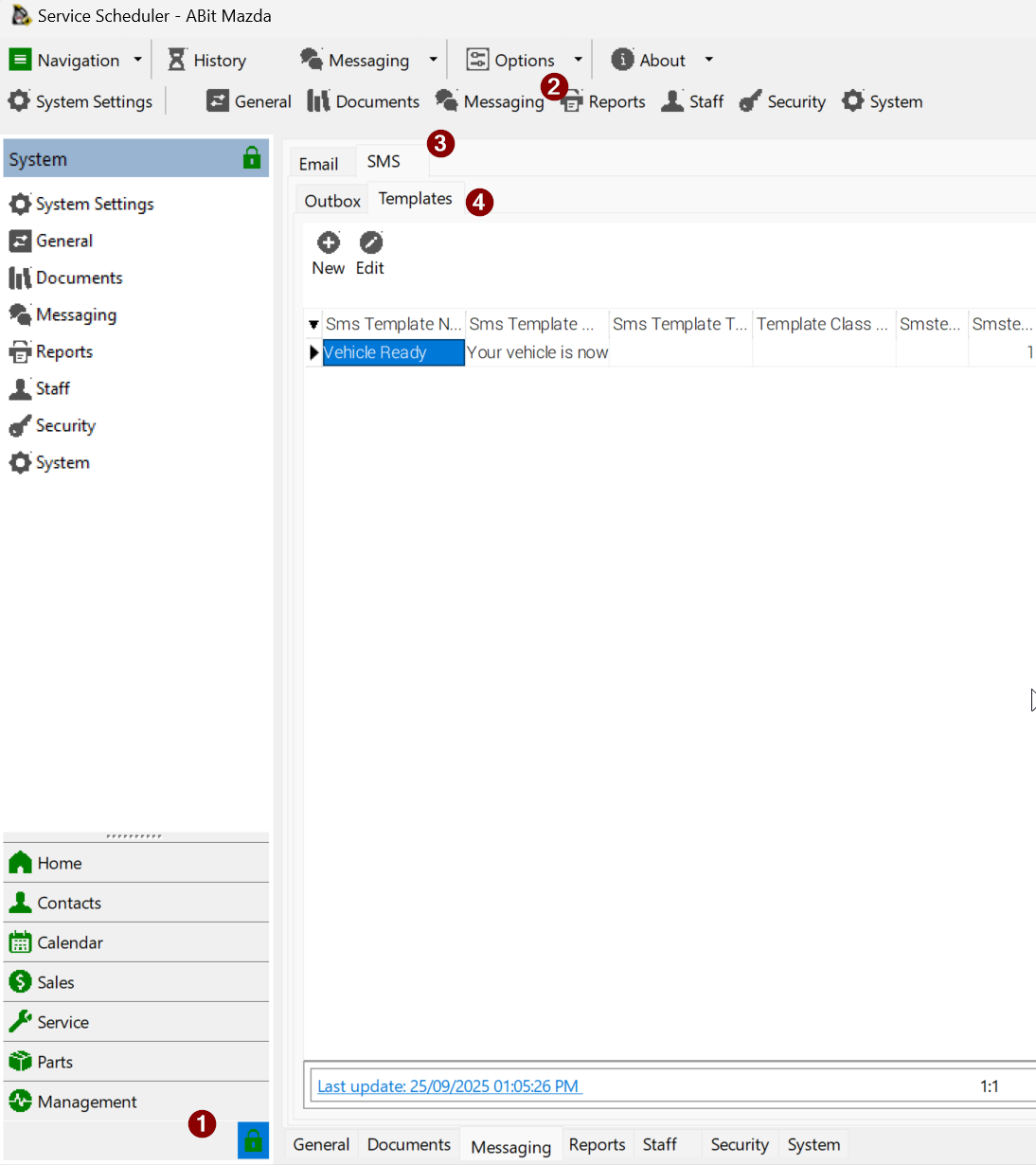
SMS templates are available under System -&gt; Messaging -&gt; SMS -&gt; Templates

[![image.png](https://help.abitsystems.com.au/uploads/images/gallery/2025-09/scaled-1680-/sZOimage.png)](https://help.abitsystems.com.au/uploads/images/gallery/2025-09/sZOimage.png)

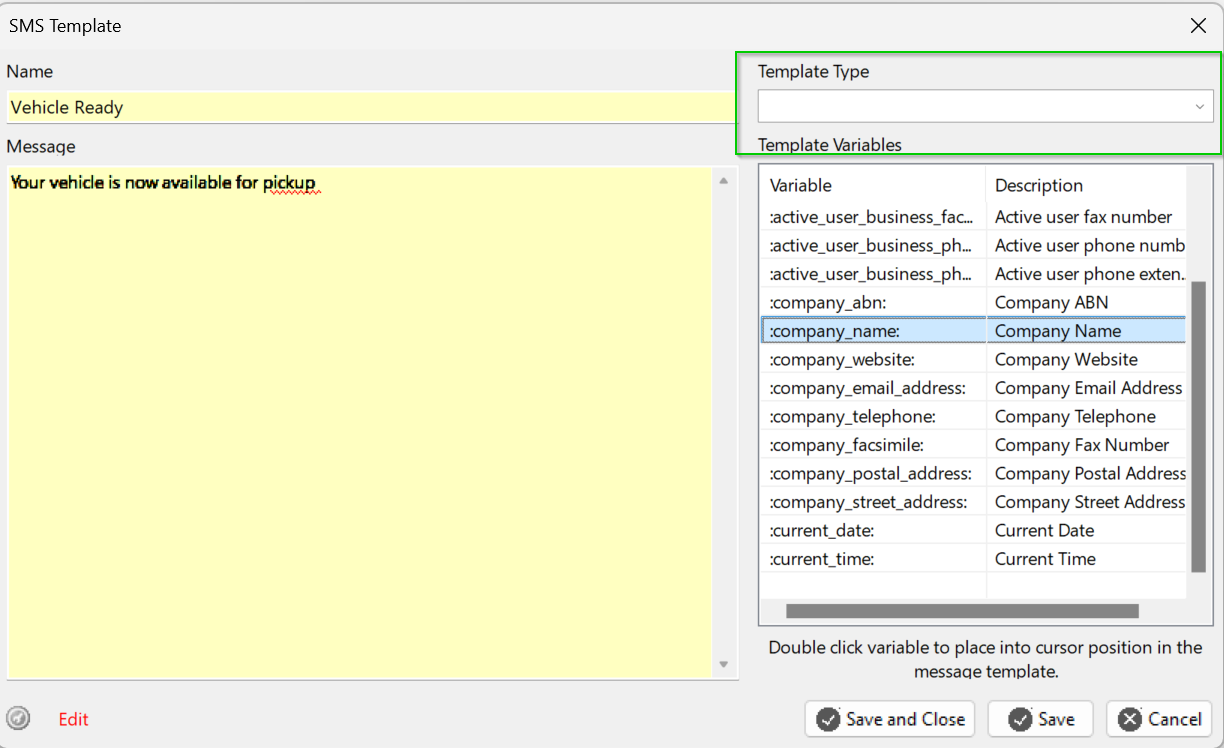
An SMS template can include data related to the module you are sending it from. For example a service job could use the field :license: to send a message that include the vehicle registration.

[![image.png](https://help.abitsystems.com.au/uploads/images/gallery/2025-09/scaled-1680-/oxTimage.png)](https://help.abitsystems.com.au/uploads/images/gallery/2025-09/oxTimage.png)
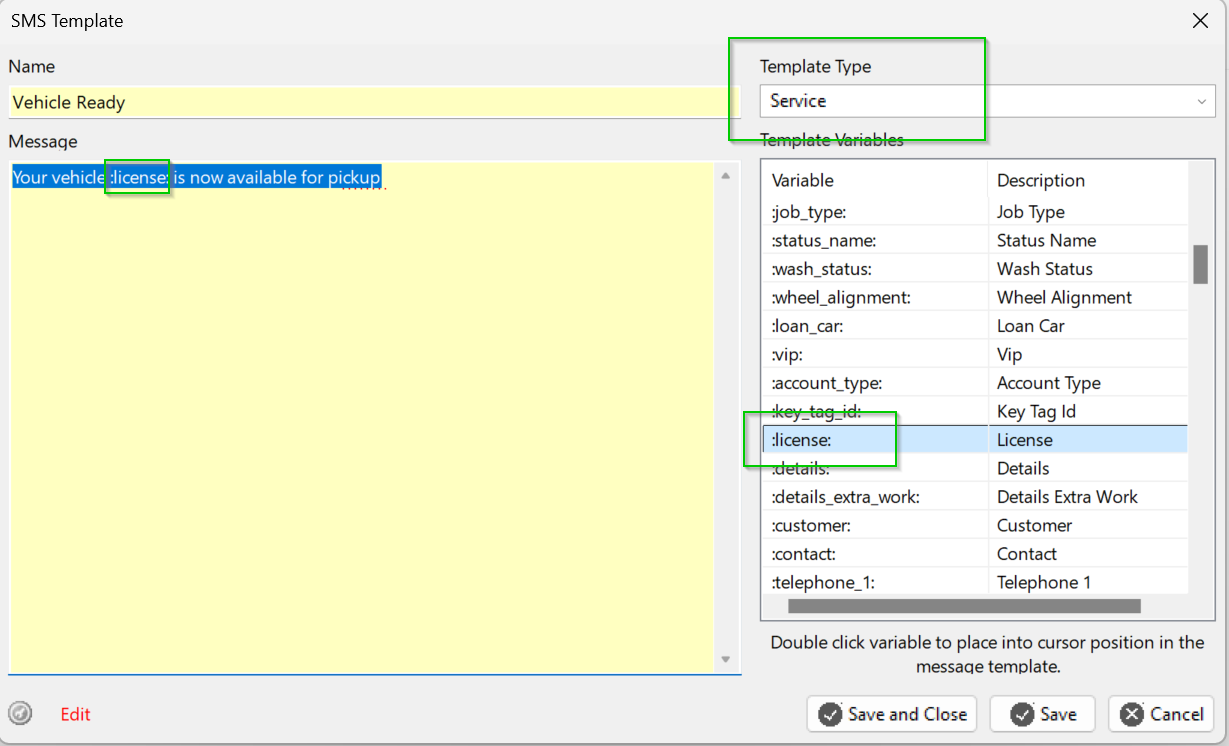
If the template type is left blank then the template is generic and can be used anywhere. This limits template fields to generic business and user details.

[![image.png](https://help.abitsystems.com.au/uploads/images/gallery/2025-09/scaled-1680-/ephimage.png)](https://help.abitsystems.com.au/uploads/images/gallery/2025-09/ephimage.png)
# User administration - Azure

# Register Entra application

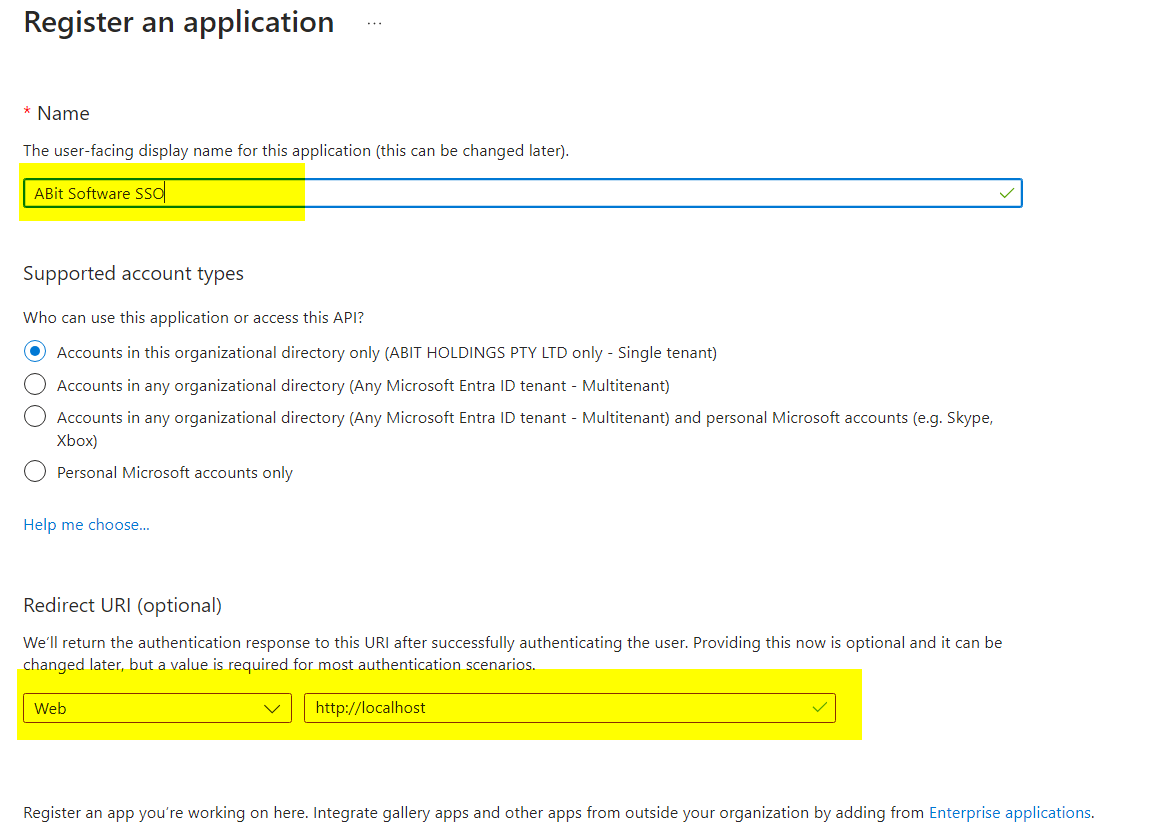
Basic application setup

<table border="1" id="bkmrk-create-a-new-applica" style="border-collapse: collapse; width: 100%; height: 1427.5px;"><colgroup><col style="width: 74.4524%;"></col><col style="width: 25.6429%;"></col></colgroup><tbody><tr style="height: 456.513px;"><td style="height: 456.513px;">[<span style="color: #444444;">![image.png](https://help.abitsystems.com.au/uploads/images/gallery/2024-11/scaled-1680-/aO5image.png)</span>](https://help.abitsystems.com.au/uploads/images/gallery/2024-11/aO5image.png)

</td><td style="height: 456.513px;">Create a new application and allow Web URL of http://localhost</td></tr><tr style="height: 273.2px;"><td style="height: 273.2px;">[<span style="color: #444444;">![image.png](https://help.abitsystems.com.au/uploads/images/gallery/2024-11/scaled-1680-/W1eimage.png)</span>](https://help.abitsystems.com.au/uploads/images/gallery/2024-11/W1eimage.png)

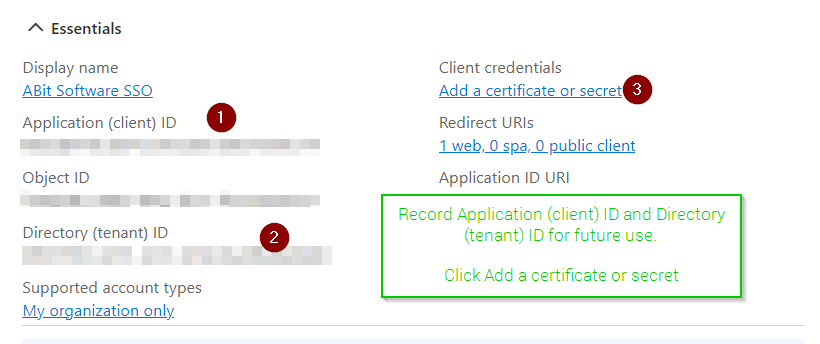
</td><td style="height: 273.2px;">Record Application (client) ID and Directory (tenant) ID for future use.

Click Add a certificate or secret

</td></tr><tr style="height: 552.763px;"><td style="height: 552.763px;">[![image.png](https://help.abitsystems.com.au/uploads/images/gallery/2024-11/scaled-1680-/Jbqimage.png)](https://help.abitsystems.com.au/uploads/images/gallery/2024-11/Jbqimage.png)

<span style="color: #444444;">  
</span>

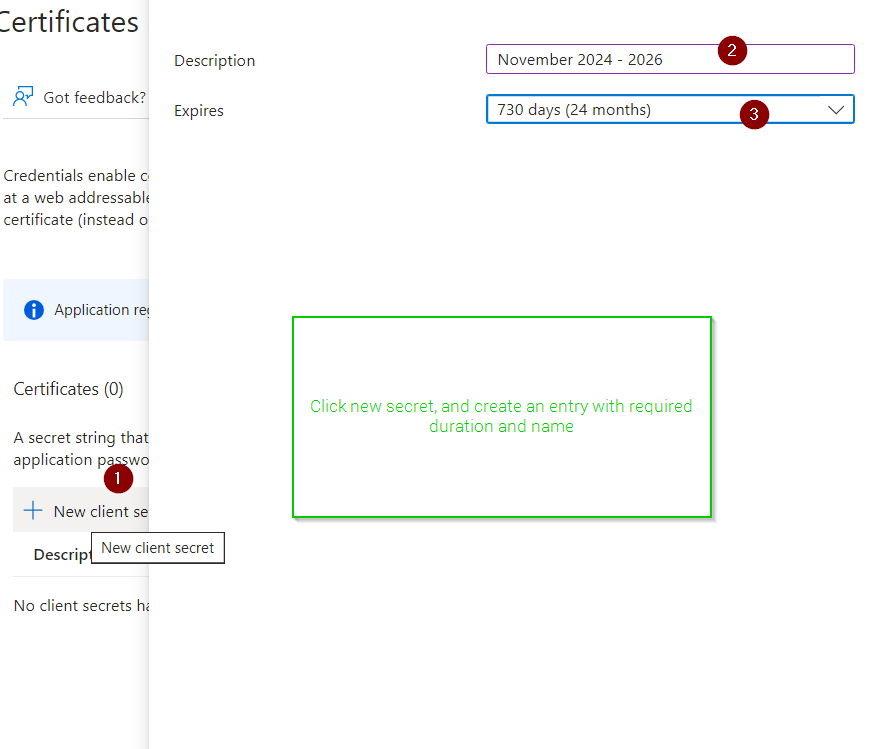
</td><td style="height: 552.763px;">Click new secret, and create an entry with required duration and name

</td></tr><tr style="height: 145.025px;"><td style="height: 145.025px;">[![image.png](https://help.abitsystems.com.au/uploads/images/gallery/2024-11/scaled-1680-/QkOimage.png)](https://help.abitsystems.com.au/uploads/images/gallery/2024-11/QkOimage.png)

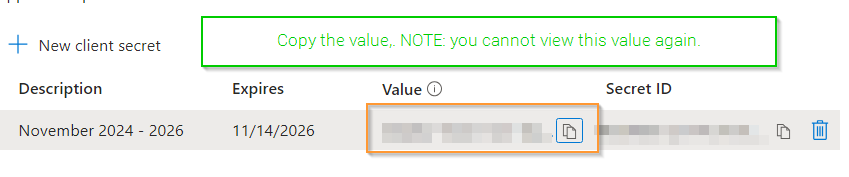
</td><td style="height: 145.025px;">Copy the value.

<p class="callout danger">NOTE: you cannot view this value again.</p>

</td></tr></tbody></table>

### Allow groups for authentication restrictions

<table border="1" id="bkmrk-to-access-group-deta" style="border-collapse: collapse; width: 100%;"><colgroup><col style="width: 73.8572%;"></col><col style="width: 26.2381%;"></col></colgroup><tbody><tr><td>[![image.png](https://help.abitsystems.com.au/uploads/images/gallery/2024-11/scaled-1680-/hUvimage.png)](https://help.abitsystems.com.au/uploads/images/gallery/2024-11/hUvimage.png)

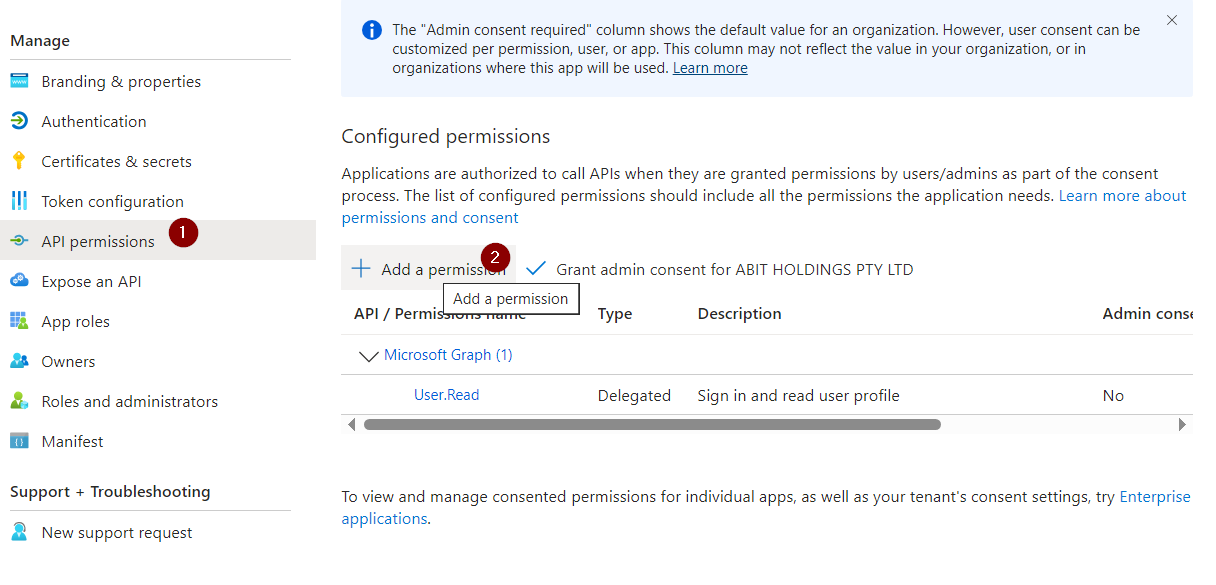
</td><td>To access group details the API needs Group.Read.All application permission </td></tr><tr><td>[![image.png](https://help.abitsystems.com.au/uploads/images/gallery/2024-11/scaled-1680-/x3Ximage.png)](https://help.abitsystems.com.au/uploads/images/gallery/2024-11/x3Ximage.png)

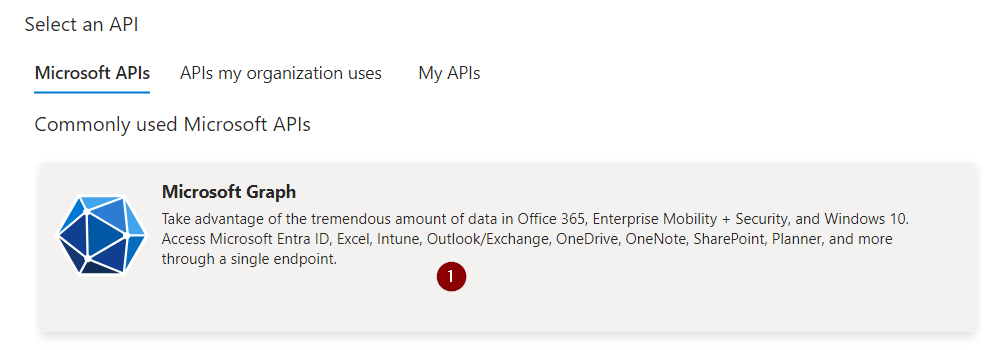
</td><td>Select Microsoft Graph</td></tr><tr><td>[![image.png](https://help.abitsystems.com.au/uploads/images/gallery/2024-11/scaled-1680-/CZwimage.png)](https://help.abitsystems.com.au/uploads/images/gallery/2024-11/CZwimage.png)

</td><td>Select delegated permissions and search for group to add Group.Read.All</td></tr><tr><td>[![image.png](https://help.abitsystems.com.au/uploads/images/gallery/2024-11/scaled-1680-/1vgimage.png)](https://help.abitsystems.com.au/uploads/images/gallery/2024-11/1vgimage.png)

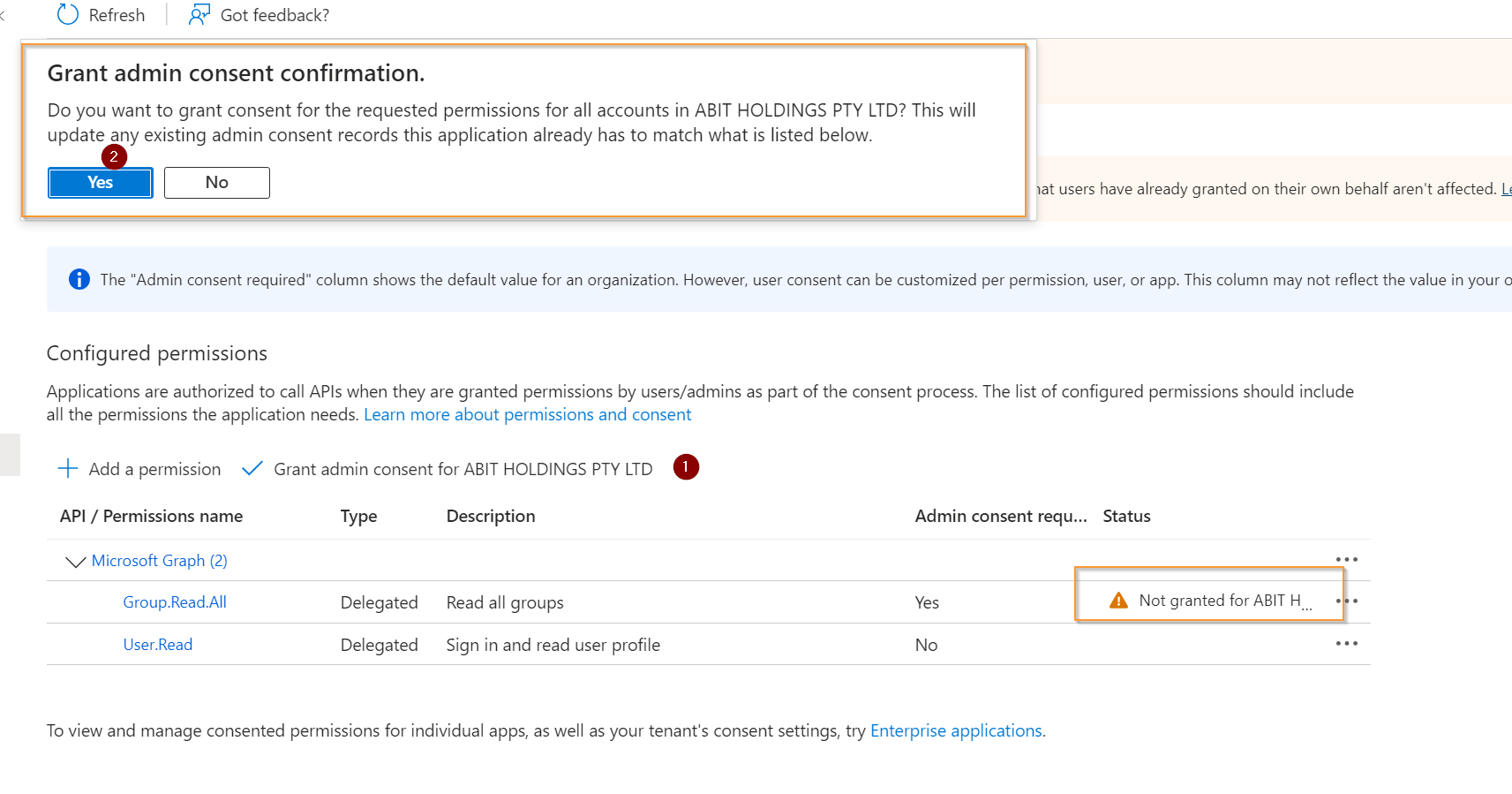
</td><td>Confirm admin consent</td></tr></tbody></table>

# Update global settings

You will need the Azure clientid, applicationid and secret from the [Azure Application](https://help.abitsystems.com.au/books/service-scheduler-administration/page/register-entra-application "Register application")

<table border="1" id="bkmrk-start-the-service-sc" style="border-collapse: collapse; width: 100%;"><colgroup><col style="width: 65.4048%;"></col><col style="width: 34.6905%;"></col></colgroup><tbody><tr><td>[<span style="color: #444444;">![image.png](https://help.abitsystems.com.au/uploads/images/gallery/2024-11/scaled-1680-/m91image.png)</span>](https://help.abitsystems.com.au/uploads/images/gallery/2024-11/m91image.png)

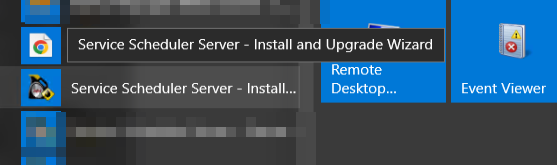
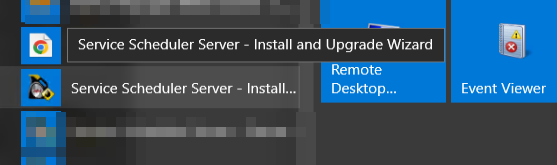
</td><td>Start the Service Scheduler Install / Upgrade wizard on the server</td></tr><tr><td>[<span style="color: #444444;">![image.png](https://help.abitsystems.com.au/uploads/images/gallery/2024-11/scaled-1680-/km4image.png)</span>](https://help.abitsystems.com.au/uploads/images/gallery/2024-11/km4image.png)

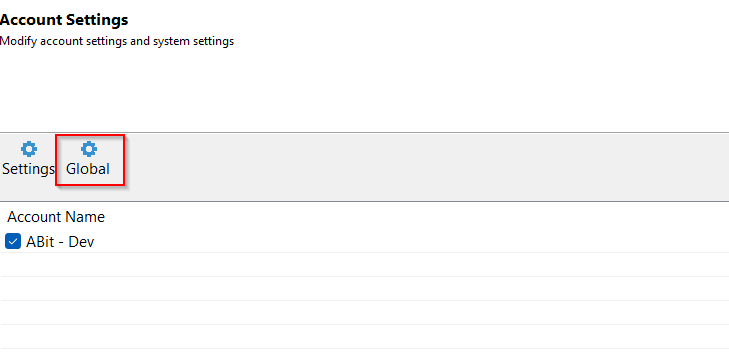
</td><td>Click next until the Account Settings page and select "Global"</td></tr><tr><td>[<span style="color: #444444;">![image.png](https://help.abitsystems.com.au/uploads/images/gallery/2024-11/scaled-1680-/Whrimage.png)</span>](https://help.abitsystems.com.au/uploads/images/gallery/2024-11/Whrimage.png)

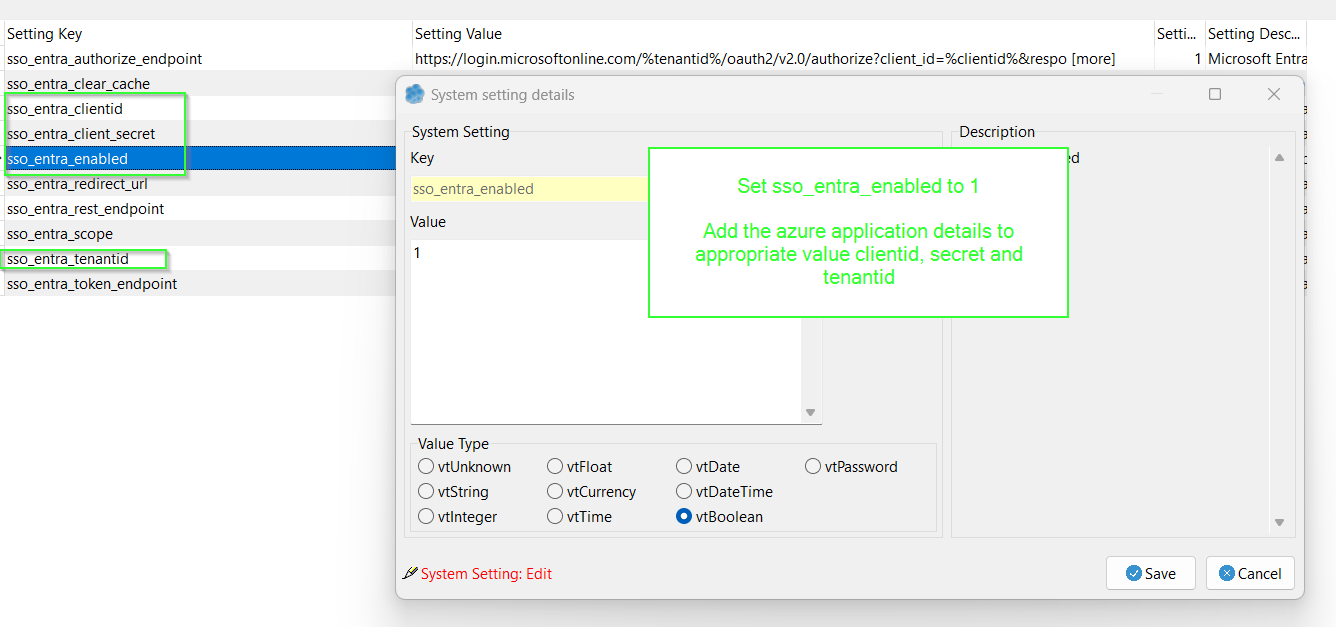
</td><td>Set sso\_entra\_enabled to 1

Add the azure application details to appropriate value clientid, secret and tenantid

</td></tr></tbody></table>

### Stop service scheduler for prompting for account on login

<table border="1" id="bkmrk-to-stop-the-prompt-a" style="border-collapse: collapse; width: 100%;"><colgroup><col style="width: 50%;"></col><col style="width: 50%;"></col></colgroup><tbody><tr><td>[![image.png](https://help.abitsystems.com.au/uploads/images/gallery/2024-11/scaled-1680-/KZpimage.png)](https://help.abitsystems.com.au/uploads/images/gallery/2024-11/KZpimage.png)

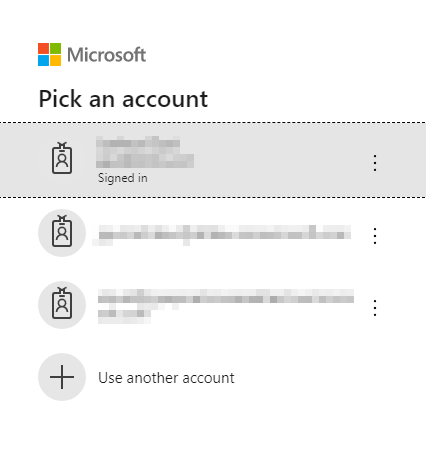
</td><td>To stop the prompt adjust global setting sso\_entra\_authorize\_endpoint</td></tr><tr><td>[![image.png](https://help.abitsystems.com.au/uploads/images/gallery/2024-11/scaled-1680-/bzrimage.png)](https://help.abitsystems.com.au/uploads/images/gallery/2024-11/bzrimage.png)

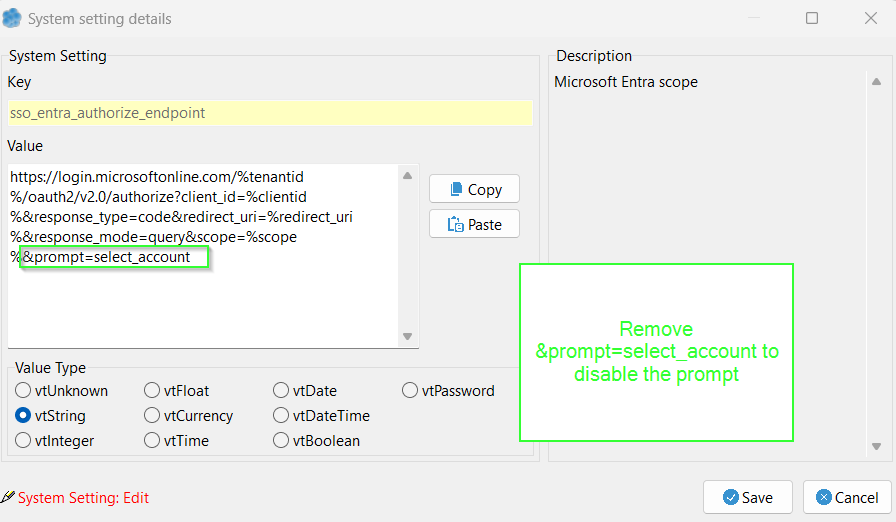
</td><td>[https://login.microsoftonline.com/%tenantid%/oauth2/v2.0/authorize?client\_id=%clientid%&amp;response\_type=code&amp;redirect\_uri=%redirect\_uri%&amp;response\_mode=query&amp;scope=%scope%&amp;prompt=select\_account](https://login.microsoftonline.com/%tenantid%/oauth2/v2.0/authorize?client_id=%clientid%&response_type=code&redirect_uri=%redirect_uri%&response_mode=query&scope=%scope%&prompt=select_account)

Remove the &amp;prompt=select\_account to disable.

</td></tr></tbody></table>

# Limit access to groups / UPN

<p class="callout info">For groups to work the Microsoft Entra application will need [Group.Read.All](https://help.abitsystems.com.au/books/service-scheduler-administration/page/register-entra-application "Register Entra application") permission</p>

<table border="1" id="bkmrk-select-settings-loca" style="border-collapse: collapse; width: 100%;"><colgroup><col style="width: 68.9683%;"></col><col style="width: 31.1111%;"></col></colgroup><tbody><tr><td>[![image.png](https://help.abitsystems.com.au/uploads/images/gallery/2024-11/scaled-1680-/dElimage.png)](https://help.abitsystems.com.au/uploads/images/gallery/2024-11/dElimage.png)

</td><td>Start the Service Scheduler install and upgrade wizard</td></tr><tr><td>[![image.png](https://help.abitsystems.com.au/uploads/images/gallery/2024-11/scaled-1680-/9bFimage.png)](https://help.abitsystems.com.au/uploads/images/gallery/2024-11/9bFimage.png)

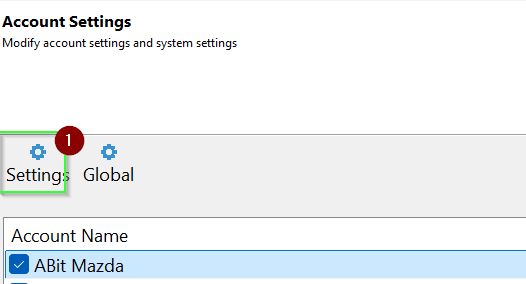
</td><td>Select settings</td></tr><tr><td>[![image.png](https://help.abitsystems.com.au/uploads/images/gallery/2024-11/scaled-1680-/djPimage.png)](https://help.abitsystems.com.au/uploads/images/gallery/2024-11/djPimage.png)

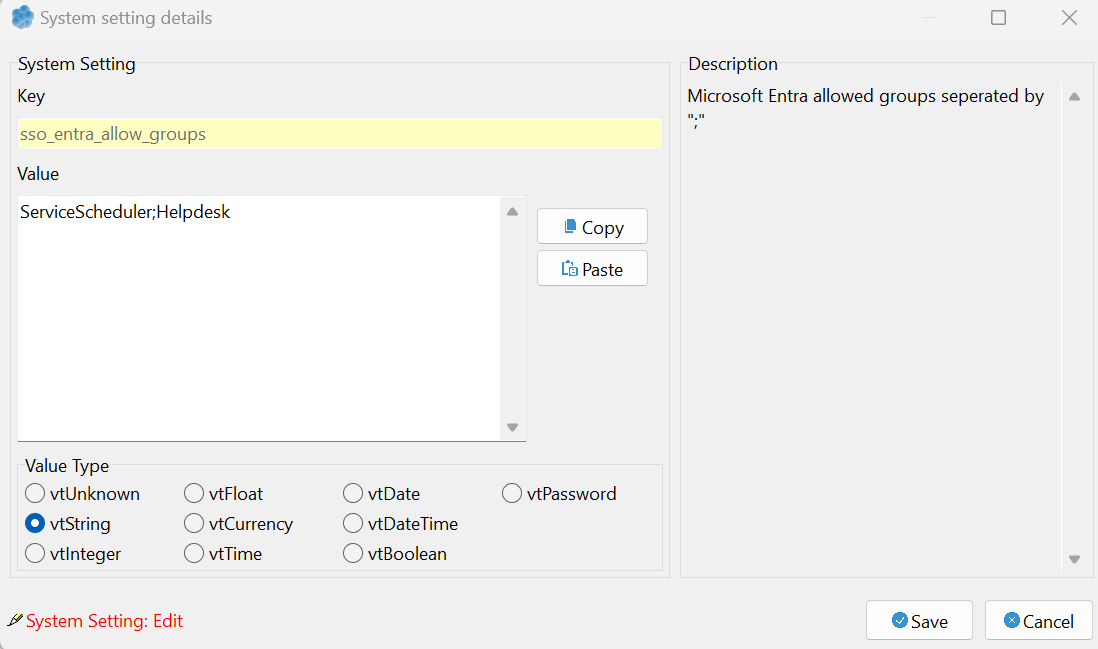
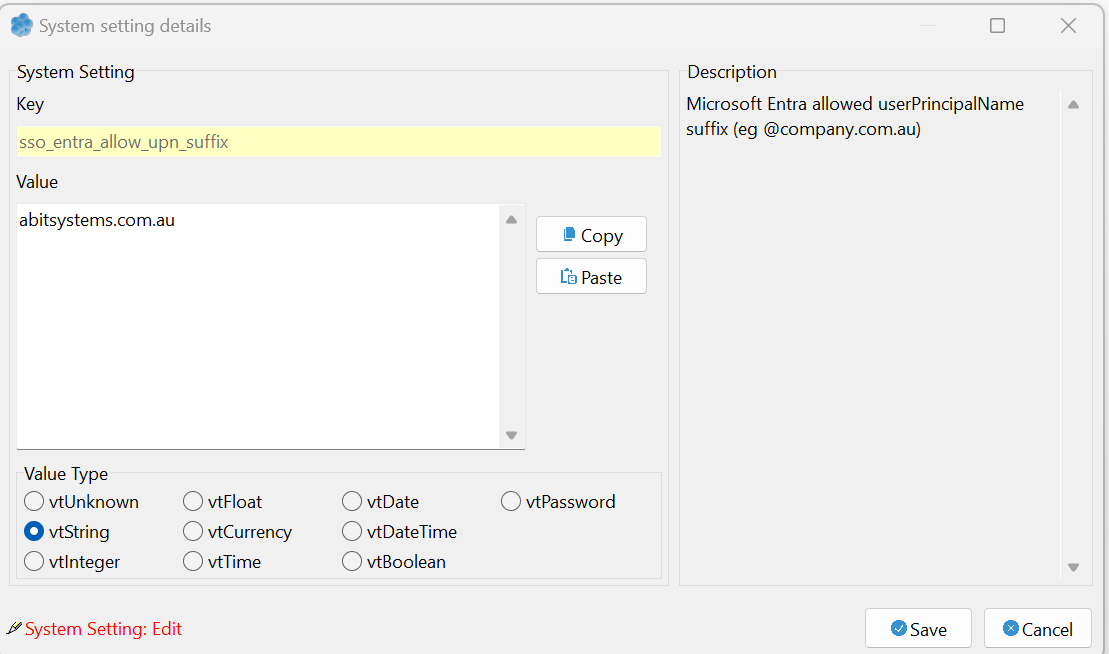
</td><td>Locate the settings sso\_entra\_allow\_groups and sso\_allow\_upn\_suffix</td></tr><tr><td>[![image.png](https://help.abitsystems.com.au/uploads/images/gallery/2024-11/scaled-1680-/Vu9image.png)](https://help.abitsystems.com.au/uploads/images/gallery/2024-11/Vu9image.png)

</td><td>To limit access to certain group, add the group names separated by the ";" character.</td></tr><tr><td>[![image.png](https://help.abitsystems.com.au/uploads/images/gallery/2024-11/scaled-1680-/nT6image.png)](https://help.abitsystems.com.au/uploads/images/gallery/2024-11/nT6image.png)

</td><td>To limit to user UPN suffix enter the userPrincipalName suffix</td></tr></tbody></table>