# User administation - account switching

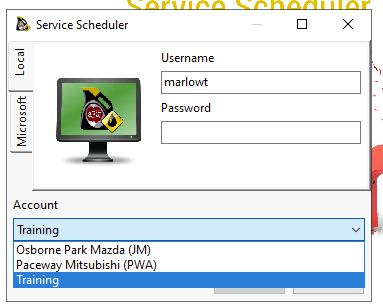
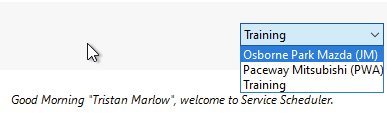
When multiple dealerships are setup in Service Scheduler, users may be granted access to swap between sites without logging out and logging back in.

<table border="1" id="bkmrk-" style="border-collapse: collapse; width: 100%;"><colgroup><col style="width: 50%;"></col><col style="width: 50%;"></col></colgroup><tbody><tr><td>[![image.png](https://help.abitsystems.com.au/uploads/images/gallery/2025-01/scaled-1680-/image.png)](https://help.abitsystems.com.au/uploads/images/gallery/2025-01/image.png)  
</td><td>[![image.png](https://help.abitsystems.com.au/uploads/images/gallery/2025-01/scaled-1680-/QXrimage.png)](https://help.abitsystems.com.au/uploads/images/gallery/2025-01/QXrimage.png)

</td></tr></tbody></table>

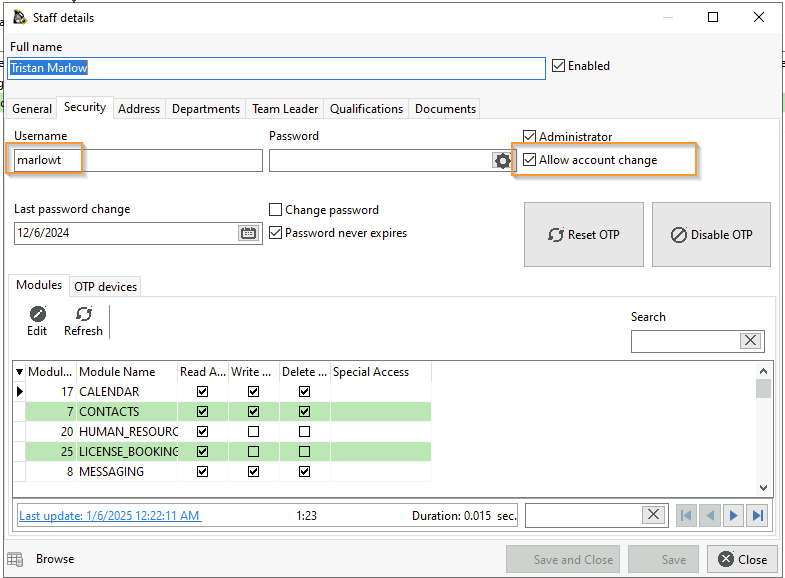
To enable, "Allow account change" must be checked in each account they are allowed to swap from. And the user must exist in all accounts with the same "username"

<p class="callout info">The passwords do not need to match, however in a local account setup it is recommended to avoid confusion if the user attempts to login to an account from the login dialog.</p>

[![image.png](https://help.abitsystems.com.au/uploads/images/gallery/2025-01/scaled-1680-/Owvimage.png)](https://help.abitsystems.com.au/uploads/images/gallery/2025-01/Owvimage.png)