# Loan car diary administration

### Creating, editing or deleting a loan car

<p class="callout danger">NOTE: Deleting a loan car that has history is not recommended. Set the vehicle to inactive</p>

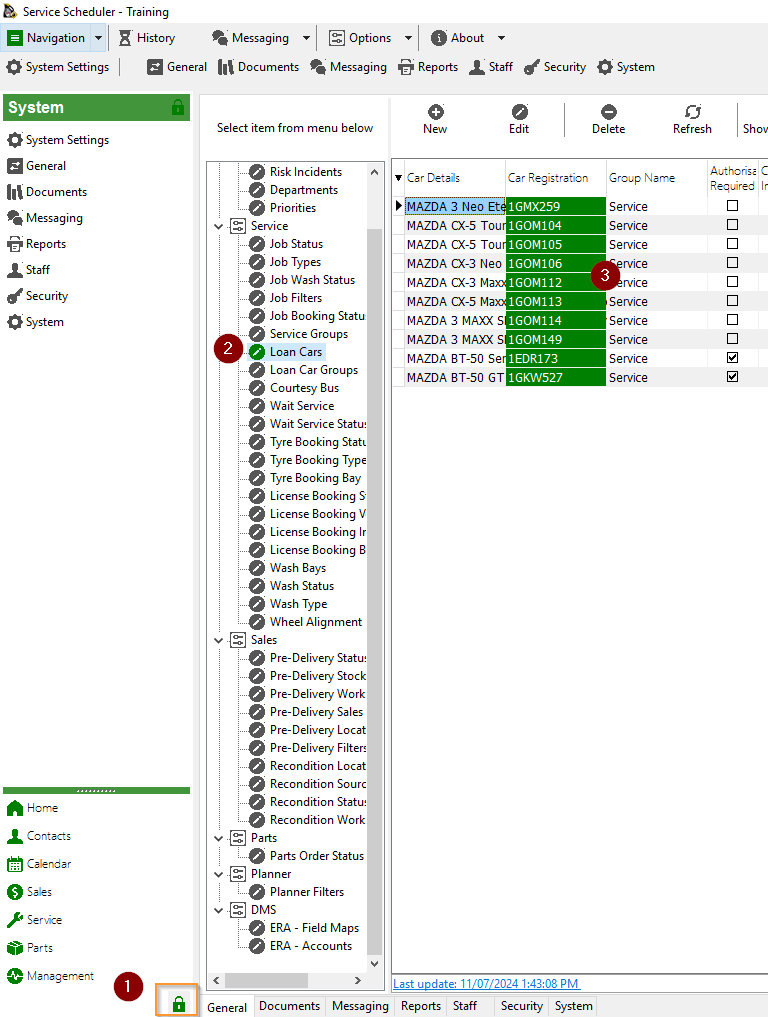
[![image.png](https://help.abitsystems.com.au/uploads/images/gallery/2024-07/scaled-1680-/Sllimage.png)](https://help.abitsystems.com.au/uploads/images/gallery/2024-07/Sllimage.png)

Create a new or edit existing vehicle

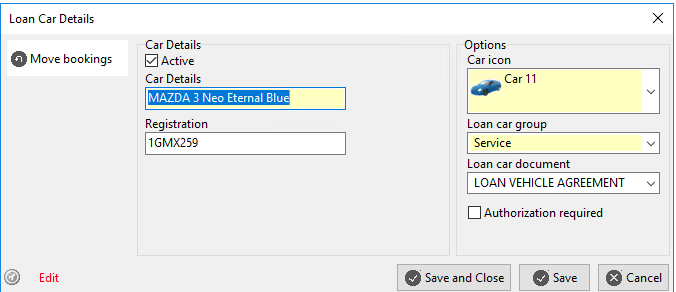
[![image.png](https://help.abitsystems.com.au/uploads/images/gallery/2024-07/scaled-1680-/OSSimage.png)](https://help.abitsystems.com.au/uploads/images/gallery/2024-07/OSSimage.png)
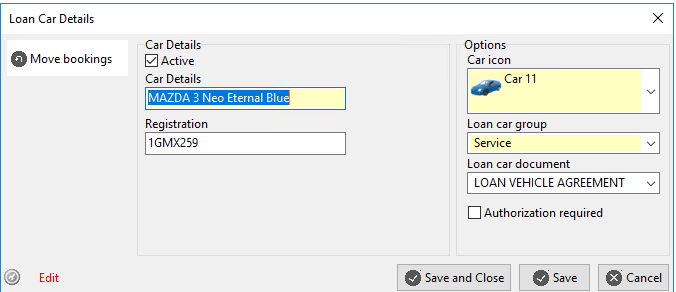
<table border="1" id="bkmrk-active-is-vehicle-av" style="border-collapse: collapse; width: 100%;"><colgroup><col style="width: 33.3333%;"></col><col style="width: 33.3333%;"></col><col style="width: 33.3333%;"></col></colgroup><tbody><tr><td>Active</td><td>Is vehicle available in the calendar</td><td>  
</td></tr><tr><td>Authorization required </td><td>To add or edit a booking a password is required</td><td>The password is specified in [system settings](https://help.abitsystems.com.au/books/service-scheduler-administration/page/system-settings "System settings") loan\_car\_override</td></tr></tbody></table>

### Moving bookings to another vehicle

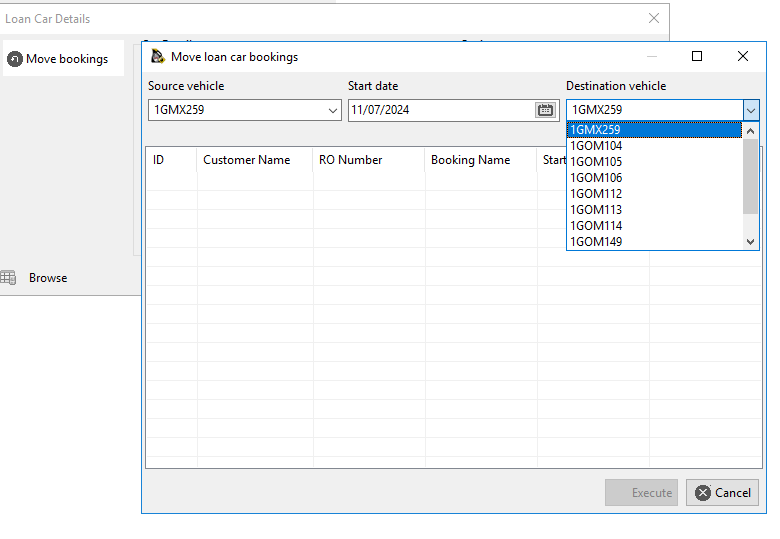
If you are making a vehicle inactive, use the "Move bookings" option to reassigned bookings to another vehicle.

[![image.png](https://help.abitsystems.com.au/uploads/images/gallery/2024-07/scaled-1680-/6R6image.png)](https://help.abitsystems.com.au/uploads/images/gallery/2024-07/6R6image.png)
### Loan car forms

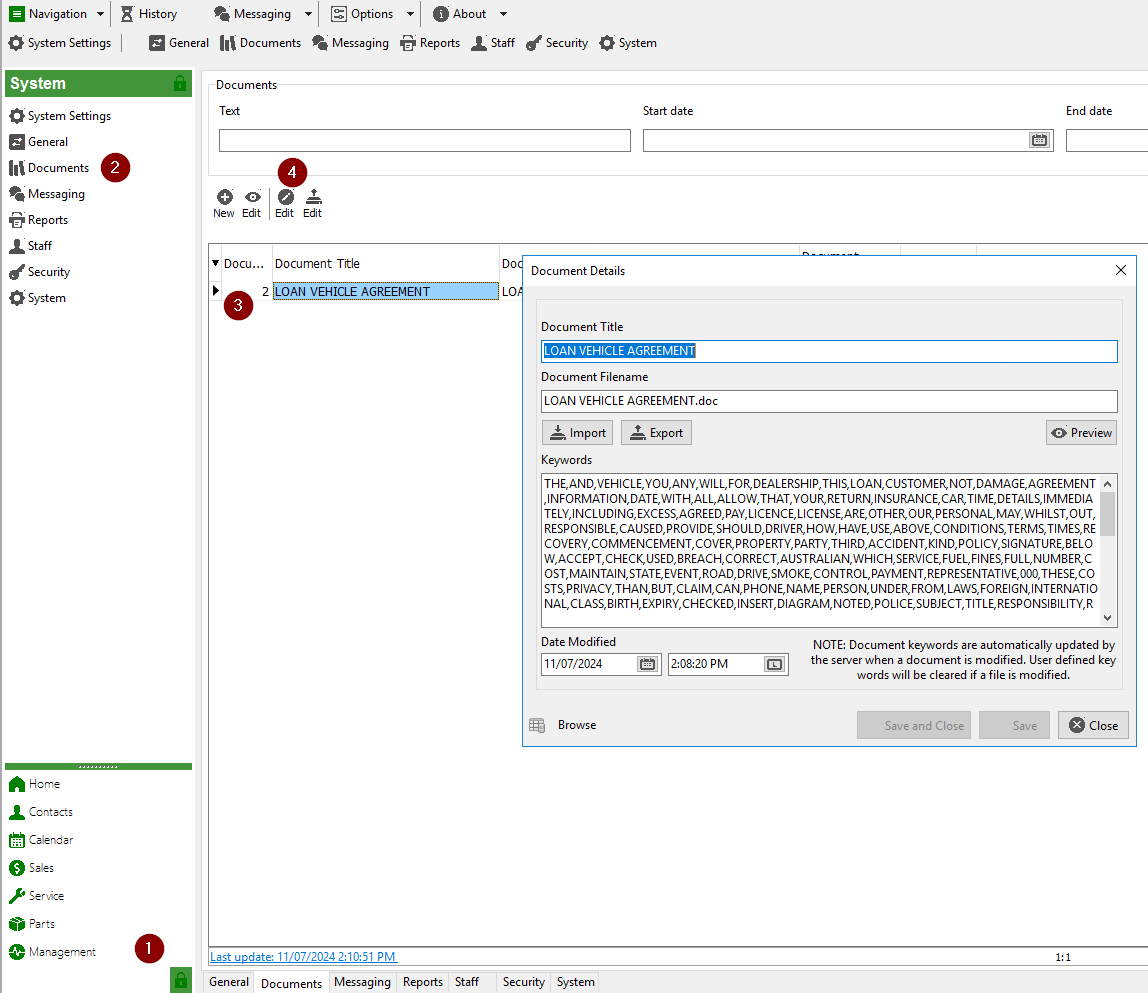
Locate the document that matches the Loan car document drop down name in system documents.

[![image.png](https://help.abitsystems.com.au/uploads/images/gallery/2024-07/scaled-1680-/pkUimage.png)](https://help.abitsystems.com.au/uploads/images/gallery/2024-07/pkUimage.png)
Use the export and import buttons to obtain the word document and replace it as needed.

[![image.png](https://help.abitsystems.com.au/uploads/images/gallery/2024-07/scaled-1680-/li9image.png)](https://help.abitsystems.com.au/uploads/images/gallery/2024-07/li9image.png)
#### Loan Form Fields (Merge Fields)

The following fields can be placed onto a loan form and data will automatically be merged.

<table border="1" id="bkmrk-field-name-descripti" style="border-collapse: collapse; width: 100%; height: 176.75px;"><colgroup><col style="width: 50.0397%;"></col><col style="width: 50.0397%;"></col></colgroup><tbody><tr style="height: 29.4583px;"><td style="height: 29.4583px;">Field name</td><td style="height: 29.4583px;">Description</td></tr><tr style="height: 29.4583px;"><td style="height: 29.4583px;">:customer\_name:</td><td style="height: 29.4583px;">Customer name</td></tr><tr style="height: 29.4583px;"><td style="height: 29.4583px;">:ro\_number:</td><td style="height: 29.4583px;">Repair Order Number</td></tr><tr style="height: 29.4583px;"><td style="height: 29.4583px;">:customer\_license\_number:</td><td style="height: 29.4583px;">Drivers license number</td></tr><tr style="height: 29.4583px;"><td style="height: 29.4583px;">:customer\_license\_expiry\_date:</td><td style="height: 29.4583px;">License expiry date</td></tr><tr style="height: 29.4583px;"><td style="height: 29.4583px;">:car\_details:</td><td style="height: 29.4583px;"><span style="font-size: 10.0pt; font-family: Roboto; mso-fareast-font-family: 'Times New Roman'; mso-fareast-theme-font: minor-fareast; mso-bidi-font-family: 'Times New Roman'; mso-bidi-theme-font: minor-bidi; mso-ansi-language: EN-AU; mso-fareast-language: EN-US; mso-bidi-language: EN-US;">Vehicle Description</span></td></tr><tr><td>:booking\_start\_date:</td><td><span style="font-size: 10.0pt; font-family: Roboto; mso-fareast-font-family: 'Times New Roman'; mso-fareast-theme-font: minor-fareast; mso-bidi-font-family: 'Times New Roman'; mso-bidi-theme-font: minor-bidi; mso-ansi-language: EN-AU; mso-fareast-language: EN-US; mso-bidi-language: EN-US;">Booking start date</span></td></tr><tr><td>:booking\_end\_date:</td><td><span style="font-size: 10.0pt; font-family: Roboto; mso-fareast-font-family: 'Times New Roman'; mso-fareast-theme-font: minor-fareast; mso-bidi-font-family: 'Times New Roman'; mso-bidi-theme-font: minor-bidi; mso-ansi-language: EN-AU; mso-fareast-language: EN-US; mso-bidi-language: EN-US;">Booking end date</span></td></tr><tr><td>:booking\_start\_time:</td><td><span style="font-size: 10.0pt; font-family: Roboto; mso-fareast-font-family: 'Times New Roman'; mso-fareast-theme-font: minor-fareast; mso-bidi-font-family: 'Times New Roman'; mso-bidi-theme-font: minor-bidi; mso-ansi-language: EN-AU; mso-fareast-language: EN-US; mso-bidi-language: EN-US;">Booking start time</span></td></tr><tr><td>:booking\_end\_time:</td><td><span style="font-size: 10.0pt; font-family: Roboto; mso-fareast-font-family: 'Times New Roman'; mso-fareast-theme-font: minor-fareast; mso-bidi-font-family: 'Times New Roman'; mso-bidi-theme-font: minor-bidi; mso-ansi-language: EN-AU; mso-fareast-language: EN-US; mso-bidi-language: EN-US;">Booking end time</span></td></tr><tr><td>:car\_registration:</td><td><span style="font-size: 10.0pt; font-family: Roboto; mso-fareast-font-family: 'Times New Roman'; mso-fareast-theme-font: minor-fareast; mso-bidi-font-family: 'Times New Roman'; mso-bidi-theme-font: minor-bidi; mso-ansi-language: EN-AU; mso-fareast-language: EN-US; mso-bidi-language: EN-US;">Vehicle Registration</span></td></tr></tbody></table>

### System settings

[System settings](https://help.abitsystems.com.au/books/service-scheduler-administration/page/system-settings "System settings") related to the loan car diary

<table border="1" id="bkmrk-key-description-loan" style="border-collapse: collapse; width: 100%;"><colgroup><col style="width: 50.0397%;"></col><col style="width: 50.0397%;"></col></colgroup><tbody><tr><td>Key</td><td>Description</td></tr><tr><td>loan\_car\_calendar\_days</td><td>Number of days to show on the loan car calendar (eg 5 or 7 days)</td></tr><tr><td>loan\_car\_delete\_password</td><td>The password used to delete an entry</td></tr><tr><td>loan\_car\_override</td><td>The password use to modify bookings on a vehicle with [![image.png](https://help.abitsystems.com.au/uploads/images/gallery/2024-07/scaled-1680-/G9Himage.png)](https://help.abitsystems.com.au/uploads/images/gallery/2024-07/G9Himage.png) checked

</td></tr></tbody></table>