# ABit SSLVPN Auto Provisioning Guide

- Ensure User Firewall account is SSLVPN and MFA Enabled.
- Register MFA for User, no need to login further.
- On User device download and Install Sophos Connect:

[https://downloads.abitsystems.com.au/support/index.php?p=sslvpnprovision&amp;dl=SophosConnect\_2\_1\_20.msi](https://downloads.abitsystems.com.au/support/index.php?p=sslvpnprovision&dl=SophosConnect_2_1_20.msi)

- Once Sophos Connect is installed, download:

[https://downloads.abitsystems.com.au/support/index.php?p=sslvpnprovision&amp;dl=ABit\_Auto\_Provision\_SSLVPN.exe](https://downloads.abitsystems.com.au/support/index.php?p=sslvpnprovision&dl=ABit_Auto_Provision_SSLVPN.exe)

- Both Downloads are in “ABit Support Downloads &gt; sslvpnprovision”. 
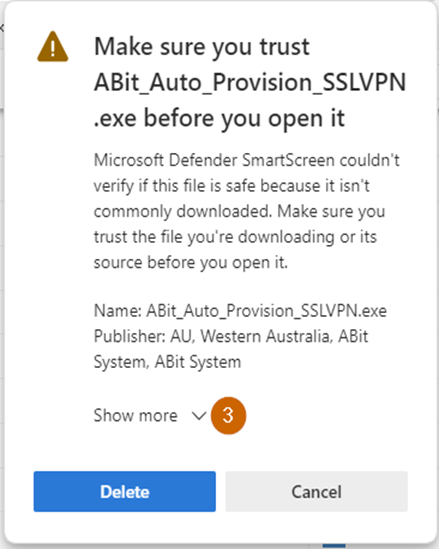
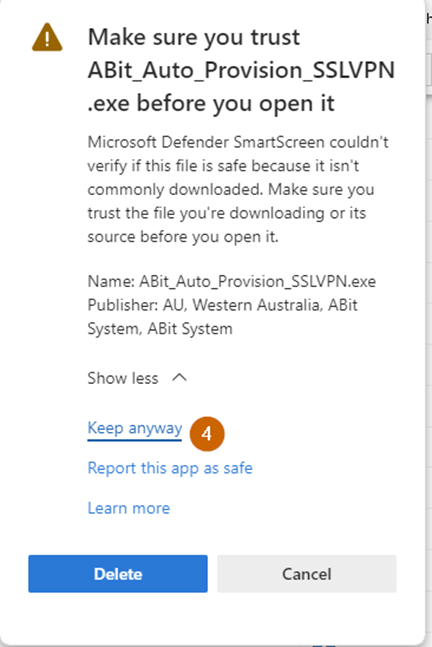
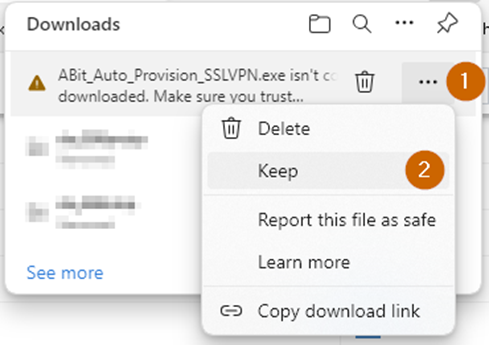
    - Keep the downloaded file, “ABit\_Auto\_Provision\_SSLVPN.exe”
![](https://help.abitsystems.com.au/uploads/images/gallery/2024-09/embedded-image-4zomnz0s.png)

![](https://help.abitsystems.com.au/uploads/images/gallery/2024-09/embedded-image-02paq5y0.png)

![](https://help.abitsystems.com.au/uploads/images/gallery/2024-09/embedded-image-huym8ycl.png)

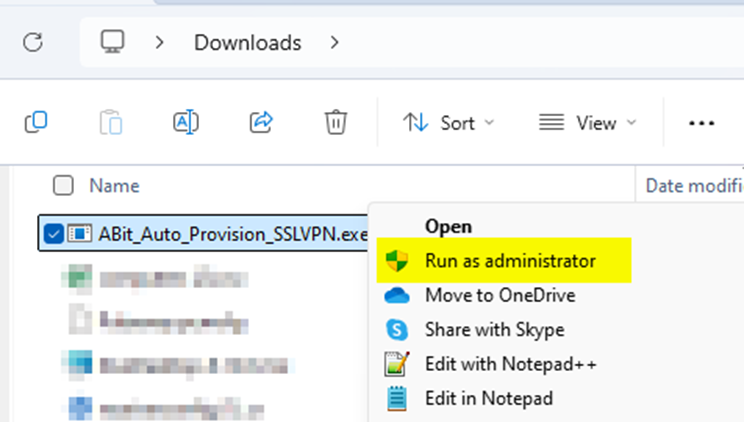
- Run “ABit\_Auto\_Provision\_SSLVPN.exe” as Administrator:
<span style="font-size: 10.0pt; line-height: 107%; font-family: Roboto; mso-fareast-font-family: 'Times New Roman'; mso-bidi-font-family: 'Times New Roman'; mso-ansi-language: EN-AU; mso-fareast-language: EN-AU; mso-bidi-language: AR-SA;">![](https://help.abitsystems.com.au/uploads/images/gallery/2024-09/embedded-image-0oimiyiu.png)</span>

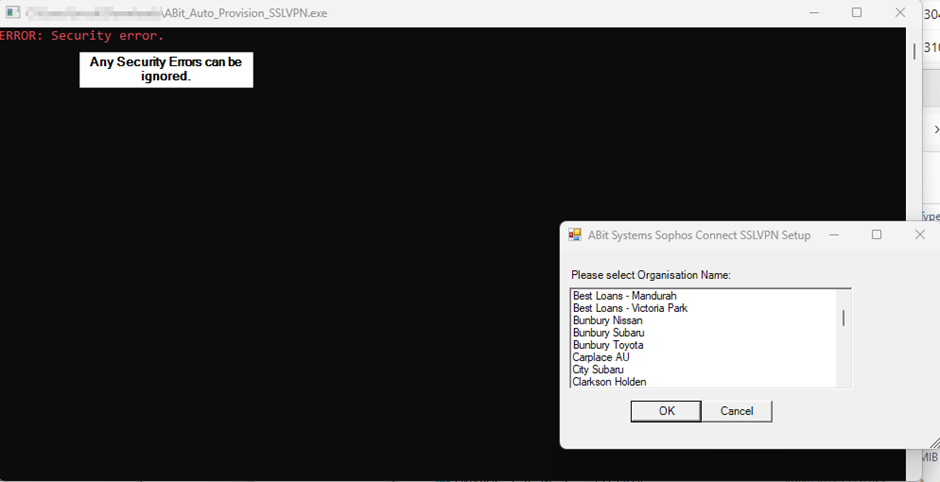
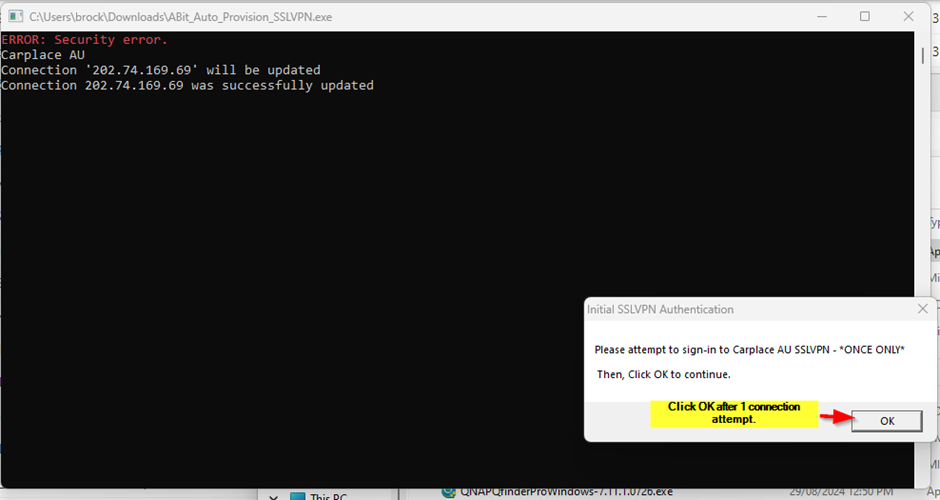
- Ignore errors, select required Organisation connection and click OK.
<span style="font-size: 10.0pt; font-family: Roboto; mso-fareast-font-family: 'Times New Roman'; mso-bidi-font-family: 'Times New Roman'; mso-fareast-language: EN-AU;">![](https://help.abitsystems.com.au/uploads/images/gallery/2024-09/embedded-image-e96wyykq.png)</span>

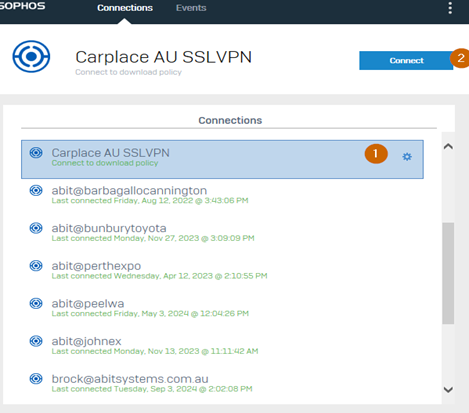
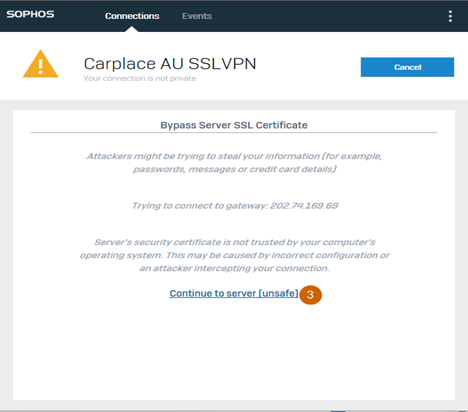
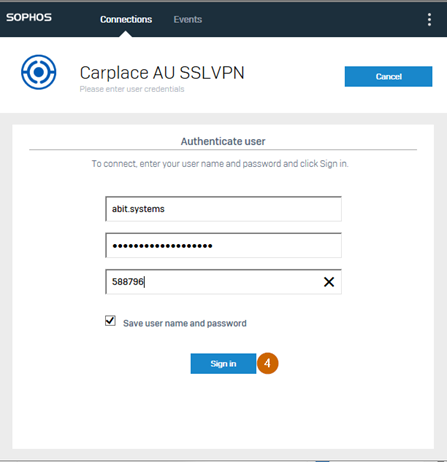
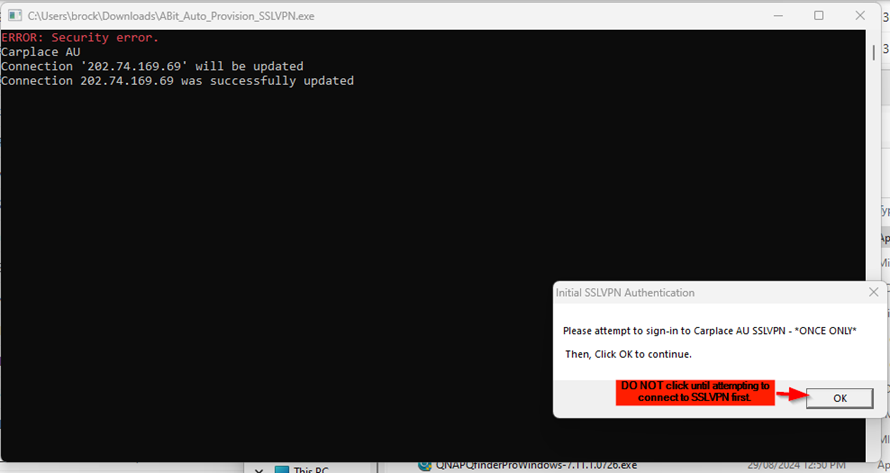
- Follow instructions in popup and attempt 1 connection to SSLVPN profile. 
    - **\*\*DO NOT IMMEDIATELY CLICK OK\*\***
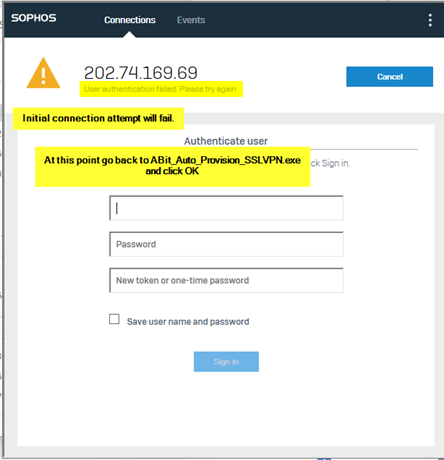
    - Initial connection will fail, this is a limitation of Sophos Connect.
<span style="font-size: 10.0pt; font-family: Roboto; mso-fareast-font-family: 'Times New Roman'; mso-bidi-font-family: 'Times New Roman'; mso-fareast-language: EN-AU;">![](https://help.abitsystems.com.au/uploads/images/gallery/2024-09/embedded-image-r8kk8yej.png)</span>

<span style="font-size: 10.0pt; font-family: Roboto; mso-fareast-font-family: 'Times New Roman'; mso-bidi-font-family: 'Times New Roman'; mso-fareast-language: EN-AU;">![](https://help.abitsystems.com.au/uploads/images/gallery/2024-09/embedded-image-suevn6d6.png)</span>

<span style="font-size: 10.0pt; font-family: Roboto; mso-fareast-font-family: 'Times New Roman'; mso-bidi-font-family: 'Times New Roman'; mso-fareast-language: EN-AU;">![](https://help.abitsystems.com.au/uploads/images/gallery/2024-09/embedded-image-udqpzdyk.png)</span>

<span style="font-size: 10.0pt; font-family: Roboto; mso-fareast-font-family: 'Times New Roman'; mso-bidi-font-family: 'Times New Roman'; mso-fareast-language: EN-AU;">![](https://help.abitsystems.com.au/uploads/images/gallery/2024-09/embedded-image-oxubsawb.png)</span>

<span style="font-size: 10.0pt; font-family: Roboto; mso-fareast-font-family: 'Times New Roman'; mso-bidi-font-family: 'Times New Roman'; mso-fareast-language: EN-AU;">![](https://help.abitsystems.com.au/uploads/images/gallery/2024-09/embedded-image-wxacmsb8.png)</span>

- Return to “ABit\_Auto\_Provision\_SSLVPN.exe” and Click OK. 
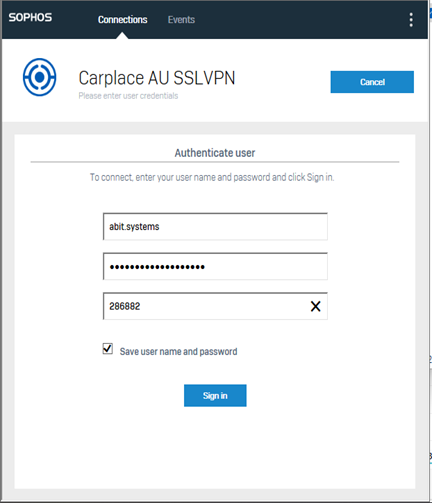
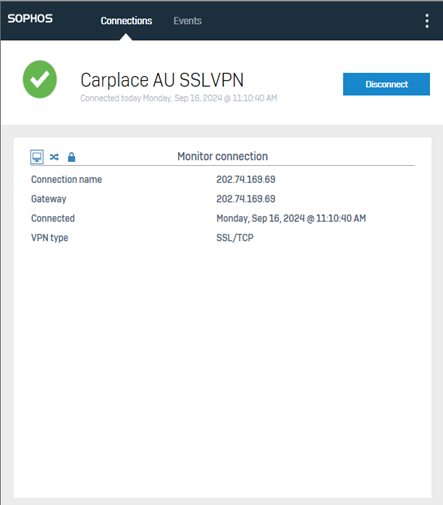
    - SSLVPN Connection name will be corrected and all subsequent connection attempts will work.
<span style="font-size: 10.0pt; font-family: Roboto; mso-fareast-font-family: 'Times New Roman'; mso-bidi-font-family: 'Times New Roman'; mso-font-kerning: 0pt; mso-ligatures: none; mso-fareast-language: EN-AU;">![](https://help.abitsystems.com.au/uploads/images/gallery/2024-09/embedded-image-aez4ptap.png)</span>

<span style="font-size: 10.0pt; font-family: Roboto; mso-fareast-font-family: 'Times New Roman'; mso-bidi-font-family: 'Times New Roman'; mso-font-kerning: 0pt; mso-ligatures: none; mso-fareast-language: EN-AU;">![](https://help.abitsystems.com.au/uploads/images/gallery/2024-09/embedded-image-pyq9za7q.png)</span>

<span style="font-size: 10.0pt; font-family: Roboto; mso-fareast-font-family: 'Times New Roman'; mso-bidi-font-family: 'Times New Roman'; mso-font-kerning: 0pt; mso-ligatures: none; mso-fareast-language: EN-AU;">![](https://help.abitsystems.com.au/uploads/images/gallery/2024-09/embedded-image-qycwmcjr.png)</span>