# User interface

### Overview

This is a general overview of the user interface for Stockie

### Login

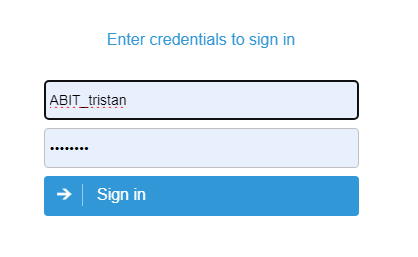
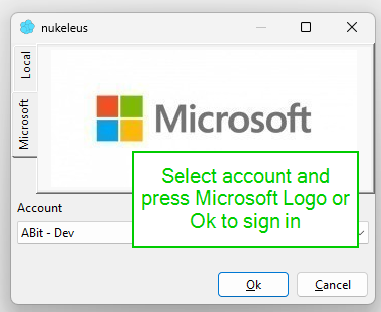
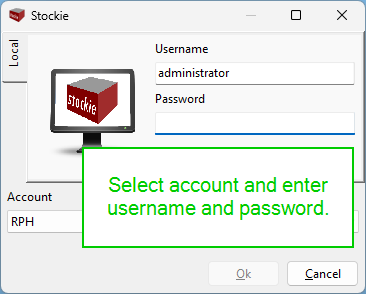
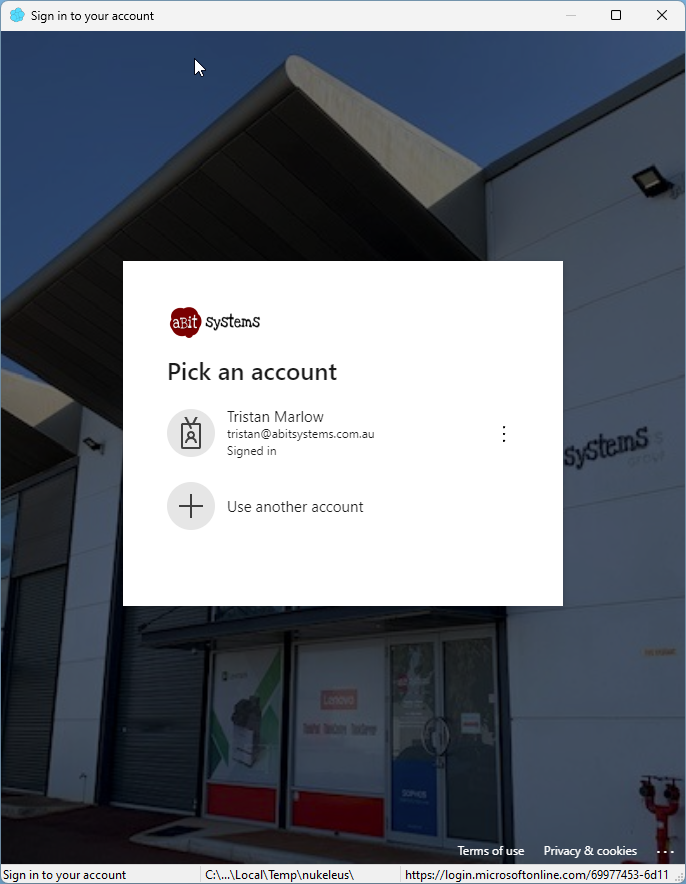
Login options may vary depending on the environment configured for your installation

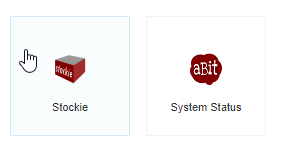
<table border="1" id="bkmrk-web-hosted-login-mic" style="border-collapse: collapse; width: 100%; height: 651.907px;"><colgroup><col style="width: 33.3333%;"></col><col style="width: 33.3333%;"></col><col style="width: 33.3333%;"></col></colgroup><tbody><tr style="height: 29.7969px;"><td style="height: 29.7969px;">Web hosted login</td><td style="height: 29.7969px;">Microsoft SSO</td><td style="height: 29.7969px;">Local or LDAP</td></tr><tr style="height: 234.469px;"><td style="height: 234.469px;">[![image.png](https://help.abitsystems.com.au/uploads/images/gallery/2025-01/scaled-1680-/lJ7image.png)](https://help.abitsystems.com.au/uploads/images/gallery/2025-01/lJ7image.png)

</td><td style="height: 234.469px;">[![image.png](https://help.abitsystems.com.au/uploads/images/gallery/2025-01/scaled-1680-/kfPimage.png)](https://help.abitsystems.com.au/uploads/images/gallery/2025-01/kfPimage.png)

</td><td style="height: 234.469px;">[![image.png](https://help.abitsystems.com.au/uploads/images/gallery/2025-01/scaled-1680-/6aXimage.png)](https://help.abitsystems.com.au/uploads/images/gallery/2025-01/6aXimage.png)

</td></tr><tr style="height: 29.7969px;"><td style="height: 29.7969px;">After login, select "Stockie"

</td><td style="height: 29.7969px;">Login to Microsoft Entra

</td><td style="height: 29.7969px;">Login complete

</td></tr><tr style="height: 357.844px;"><td style="height: 357.844px;">[![image.png](https://help.abitsystems.com.au/uploads/images/gallery/2025-01/scaled-1680-/I10image.png)](https://help.abitsystems.com.au/uploads/images/gallery/2025-01/I10image.png)

</td><td style="height: 357.844px;">[![image.png](https://help.abitsystems.com.au/uploads/images/gallery/2025-01/scaled-1680-/3IUimage.png)](https://help.abitsystems.com.au/uploads/images/gallery/2025-01/3IUimage.png)

</td><td style="height: 357.844px;"></td></tr></tbody></table>

### Home page and navigation

Change modules is available under the navigation menu. The home page offers quick search options

[![image.png](https://help.abitsystems.com.au/uploads/images/gallery/2025-01/scaled-1680-/fATimage.png)](https://help.abitsystems.com.au/uploads/images/gallery/2025-01/fATimage.png)

### History

During use of the application, the history menu will recall the prior records you have view. Use this to quickly return to an entry.

[![image.png](https://help.abitsystems.com.au/uploads/images/gallery/2025-01/scaled-1680-/zC7image.png)](https://help.abitsystems.com.au/uploads/images/gallery/2025-01/zC7image.png)

### Data grids

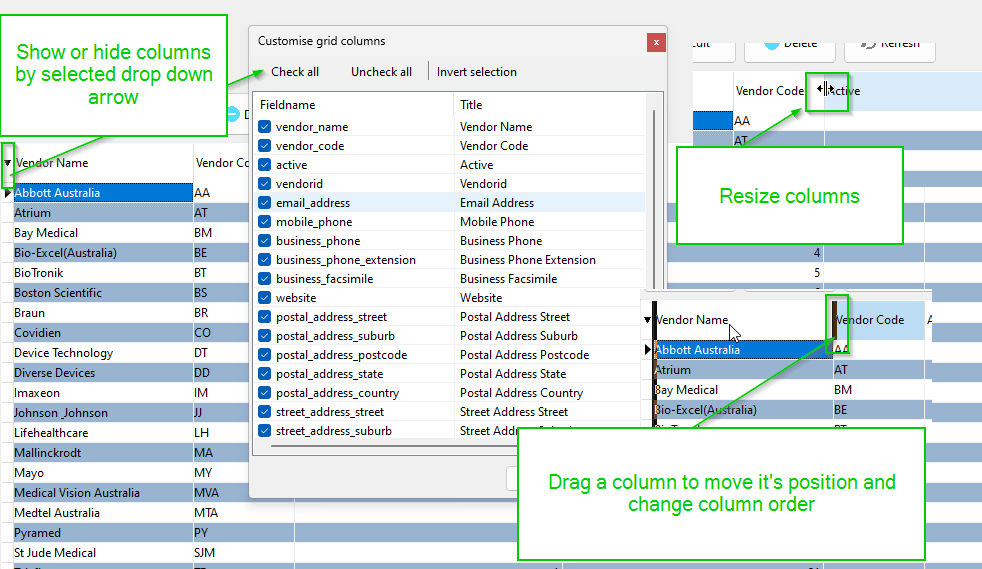
When data is displayed in a grid it will generally have the following features available.

<p class="callout info">When columns are moved, resized or hidden this applies only to the current user each user can have a unique display.</p>

[![image.png](https://help.abitsystems.com.au/uploads/images/gallery/2025-01/scaled-1680-/4nFimage.png)](https://help.abitsystems.com.au/uploads/images/gallery/2025-01/4nFimage.png)

Grid footer options

[![image.png](https://help.abitsystems.com.au/uploads/images/gallery/2025-01/scaled-1680-/baZimage.png)](https://help.abitsystems.com.au/uploads/images/gallery/2025-01/baZimage.png)

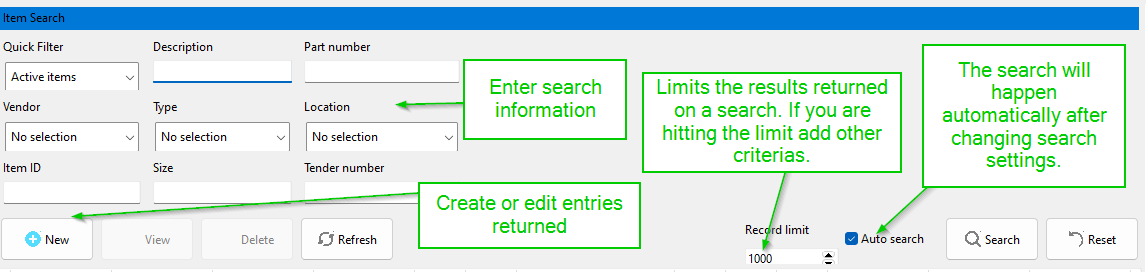
### Search panels

When a search panel is available it will allow quick search of information. The panel may also automatically search when fields are modified.

[![image.png](https://help.abitsystems.com.au/uploads/images/gallery/2025-01/scaled-1680-/siXimage.png)](https://help.abitsystems.com.au/uploads/images/gallery/2025-01/siXimage.png)
### Creating new entries

[![image.png](https://help.abitsystems.com.au/uploads/images/gallery/2025-01/scaled-1680-/rI7image.png)](https://help.abitsystems.com.au/uploads/images/gallery/2025-01/rI7image.png)
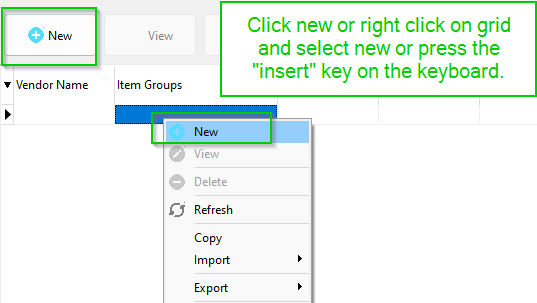
### Editing existing entries

[![image.png](https://help.abitsystems.com.au/uploads/images/gallery/2025-01/scaled-1680-/2Vrimage.png)](https://help.abitsystems.com.au/uploads/images/gallery/2025-01/2Vrimage.png)
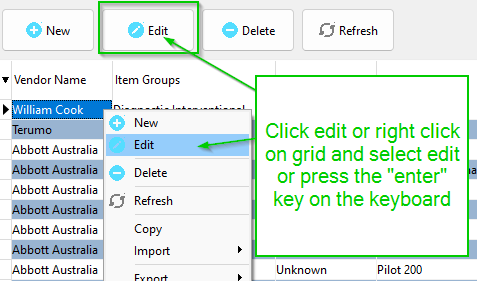
### Refresh data

[![image.png](https://help.abitsystems.com.au/uploads/images/gallery/2025-01/scaled-1680-/KLGimage.png)](https://help.abitsystems.com.au/uploads/images/gallery/2025-01/KLGimage.png)
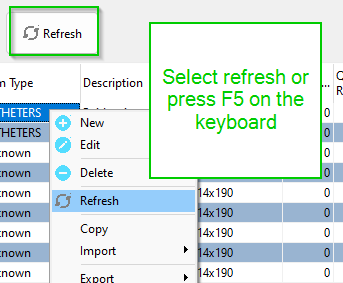
### Spell checking

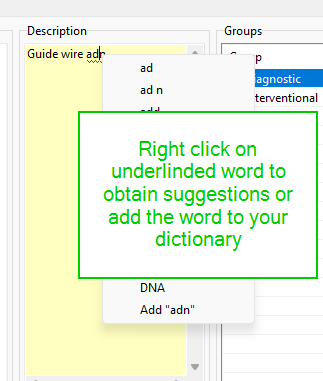
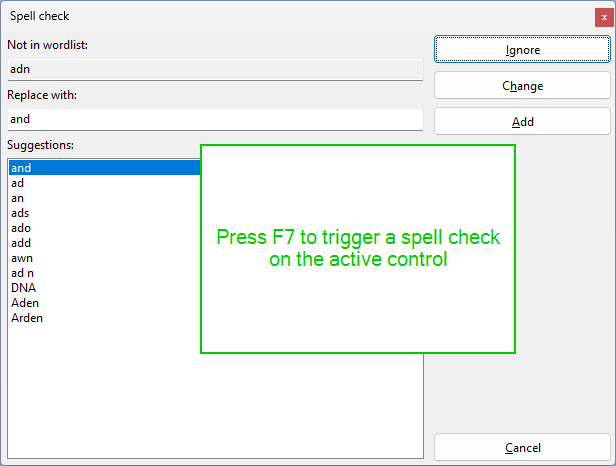
Many controls will underline words that contain mistakes. Right click on the word to fix the spelling mistake or add the word to your custom dictionary. Pressing F7 will also trigger a spell check.

<table border="1" id="bkmrk--8" style="border-collapse: collapse; width: 100%;"><colgroup><col style="width: 50%;"></col><col style="width: 50%;"></col></colgroup><tbody><tr><td>[![image.png](https://help.abitsystems.com.au/uploads/images/gallery/2025-01/scaled-1680-/pVWimage.png)](https://help.abitsystems.com.au/uploads/images/gallery/2025-01/pVWimage.png)</td><td>[![image.png](https://help.abitsystems.com.au/uploads/images/gallery/2025-01/scaled-1680-/eoQimage.png)](https://help.abitsystems.com.au/uploads/images/gallery/2025-01/eoQimage.png)

</td></tr></tbody></table>

### Grammar checking

Simple grammar checking features can be performed by pressing F6

[![image.png](https://help.abitsystems.com.au/uploads/images/gallery/2025-01/scaled-1680-/EcEimage.png)](https://help.abitsystems.com.au/uploads/images/gallery/2025-01/EcEimage.png)

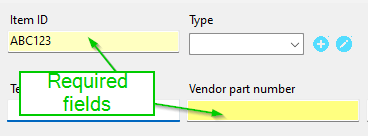
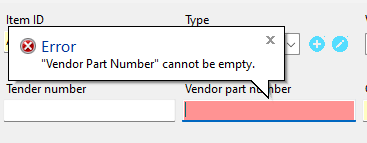
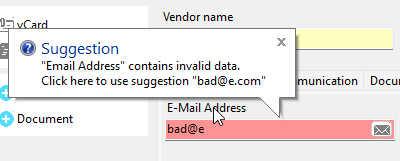
### Required fields and field alerts

A field that is required will be highlighted and an entry cannot be saved without the field containing data

<table border="1" id="bkmrk--10" style="border-collapse: collapse; width: 100%;"><colgroup><col style="width: 50%;"></col><col style="width: 50%;"></col></colgroup><tbody><tr><td>[![image.png](https://help.abitsystems.com.au/uploads/images/gallery/2025-01/scaled-1680-/vhHimage.png)](https://help.abitsystems.com.au/uploads/images/gallery/2025-01/vhHimage.png)

</td><td>[![image.png](https://help.abitsystems.com.au/uploads/images/gallery/2025-01/scaled-1680-/spEimage.png)](https://help.abitsystems.com.au/uploads/images/gallery/2025-01/spEimage.png)

</td></tr><tr><td>[![image.png](https://help.abitsystems.com.au/uploads/images/gallery/2025-01/scaled-1680-/EIyimage.png)](https://help.abitsystems.com.au/uploads/images/gallery/2025-01/EIyimage.png)

</td><td>  
</td></tr></tbody></table>

### Audit Log

Most modules will include an option to view the audit log of changes to entries in the database. The audit log will contain when and who made the changes and will also provide the old and new value.

[![image.png](https://help.abitsystems.com.au/uploads/images/gallery/2025-01/scaled-1680-/bkgimage.png)](https://help.abitsystems.com.au/uploads/images/gallery/2025-01/bkgimage.png)